82

I use Gmail as my e-mail client, but when I click on a "mailto:" link, the Mail.app is opened.

Is there a way to avoid the Mail.app opening in this case? Can I open Gmail instead?

hairboat
  • 2,903
  • 18
  • 51
  • 72

7 Answers7

108

You do NOT need to install a third party app.

Both Google Chrome and Firefox support this functionality. (ok, technically these are third party apps, but lets assume you are not using safari.)

Chrome:

  1. Open gmail in chrome.
  2. In the address bar next to the "bookmark star" you should see a grey diamond. Click on the diamond
  3. Select "use gmail". enter image description here
  4. If you do not see the gray diamond, follow the instructions below.

If you made a mistake and selected "No" and you really wanted to select "Use Gmail"

  1. With Chrome open, copy and paste this into your address bar at the top: chrome://settings/handlers
  2. Under the Ignored protocol handlers section, Click on X to the right to delete.
  3. Close and open Gmail.
  4. Answer the question correctly this time. :)

Source: http://productforums.google.com/forum/#!topic/chrome/hnRteY7bHfE

Alternative way, if you need to do this programmatically.

Firefox:

See @Am1rr3zA answer on this question. Click here to jump to his answer.

Safari:

See @fpotter's answer on this question. Click here to jump to his answer.

fpotter
  • 321
zechdc
  • 2,132
  • 2
  • 17
  • 15
  • I installed extension "mailto:Gmail" before, and, however, this answer is just way much simple and better than it. Thanks very much! – p3nchan Apr 18 '16 at 14:41
17

Update (1/2014)

Turns out Google Notifier for Mac is no longer supported.

If you're using Chrome, this is now very simple: open settings, search for "mailto", and set Gmail as the handler for mailto.

enter image description here

For Firefox, see this answer.

(The remainder of this answer is now obsolete.)


While options like Webmailer also do the job, I'll mention yet another way for the sake of completeness:

  1. Install Google Notifier for Mac. It's an official Gmail utility made by Google.
  2. Open Mail.app, go to Preferences -> General, and set "Default email reader" to Google Notifier.app. (Yep, you need to configure this in Mail even when Mail is what you don't want to use...)

alt text

Besides directing clicks on mailto: links to Gmail, the Google Notifier comes with some additional features: It adds an icon (like this: alt text) in the menu bar and notifies you (if configured to do so) about new mail in your Gmail box. Through the icon you can also access your inbox, unread messages, and "Compose mail" screen quickly.

Works great for me; I can generally vouch for this useful little app.

Jonik
  • 6,673
13

If you use Firefox 3.5 or later:

  • Go to Preferences ⌘, and and choose the Application pane.
  • Find "mailto" in the content type list, and choose what you want. If you want Gmail to open, choose it in the popup menu.

    Firefox prefs

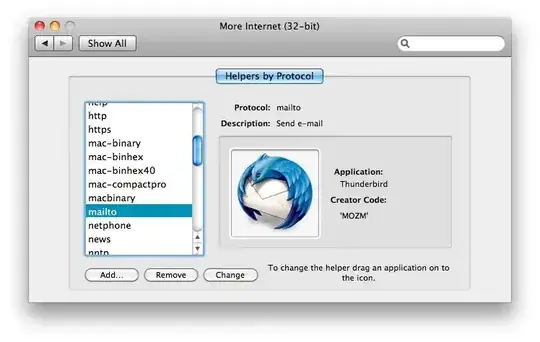
Or you can use More Internet, a System Preferences pane that lets you choose which applications are set as helpers for Internet protocols. More Internet
Dori
  • 7,235
  • 1
  • 33
  • 40
Am1rr3zA
  • 13,219
  • 14
  • 68
  • 88
  • More Internet link is broken. – Sherwood Botsford Mar 17 '16 at 14:47
  • This fixed an issue where mailto links were causing Firefox to open an infinite amount of new tabs. My FF settings had Firefox as the mail client, as did OS X. Changing the mailto setting in Firefox to Gmail fixed that. – zymhan May 20 '16 at 18:55
11

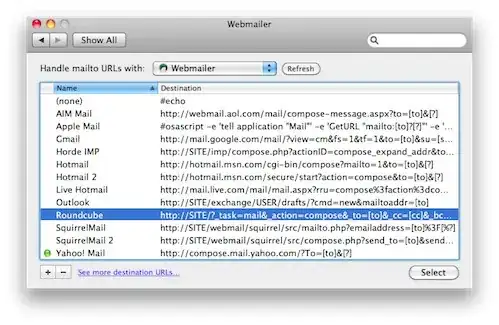
With Webmailer, you can set up any webmail client as the default email client in OS X.
  • 1
    I like this more than the Google Notifier, as it is one less thing cluttering up my icon bar. Note: as of May 2012, development on Webmailer is probably stopping due to the developer getting a job at Apple (source: his blog) – Dolan Antenucci Jan 22 '13 at 03:39
  • 1
    This crashes for me in the system preferences panel whenever I try to change the mailto: handler. Webmailer 1.3, OSX 10.8.3 – SimplGy Apr 20 '13 at 18:24
  • 3
    Getting crashes if you click anything in the Webmailer prefpane in Mavericks. Since the project is dead now, this doesn't seem like the best answer anymore (unless someone else picks up the source). – Phoebe Nov 22 '13 at 16:45
  • now defunct, you can probably delete this answer now – Dan Rosenstark Apr 07 '15 at 19:56
3

You could use Mailplane. Mailplane is a site-specific browser for GMail that offers better OS-level integration. Mailplane can act as the default email client.

http://mailplaneapp.com/

John Brayton
  • 101
  • 4
  • +1 for MailPlane, it’s really good. Especially if you’re used to Mail.app – Martin Marconcini Oct 09 '10 at 06:09
  • When you set Mailplane as the default email client, then the "Share via email" option in Preview (and iWork, and other apps) disappears: http://mailplaneapp.com/howto/entry/iwork_share_with_email/ – Matt Nov 13 '13 at 10:48
2

You can do this with Firefox in two steps...

  1. Go to Firefox preferences, Applications, search for mailto: and change the application action to "Use Gmail".
  2. Follow Apple's instructions here and choose Firefox as the email app.
klanomath
  • 66,391
  • 9
  • 130
  • 201
-3

You could use Sparrow which is a very clean and spare Gmail client. I've been using it for a while and love it.

Go to Mail.app / Preferences / General / and make Sparrow your default email reader.

Richard
  • 1,492