41

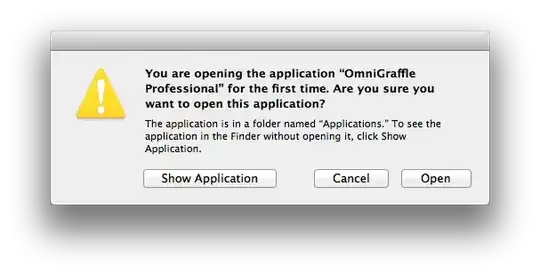
I often get the dialog box warning me that I'm opening an application for the first time. But, it isn't the first time. Some of these are applications that I use daily. enter image description here

I seem to be getting more of these after an OS upgrade, almost as if some database got reset. Can I do something to get these warnings to be generated properly?

kopischke
  • 5,166
Bill Nace
  • 2,037
  • One more idea for someone with a similar problem: Each time the application (RStudio, recently updated) was called as a subordinate command (as part of opening an RProject file, long-standing shortcut), I got the warning dialog. After I opened the application directly once, using the shortcut no longer triggered the dialog. – InColorado Nov 17 '22 at 19:55

3 Answers3

45

This warning pops up every time an application wants to register a URI handler (a something:// protocol). Normally, your approval is saved by LaunchServices, but that database can become corrupted. Try resetting it by doing a

/System/Library/Frameworks/CoreServices.framework/Versions/A/Frameworks/LaunchServices.framework/Versions/A/Support/lsregister -kill -r -all local,system,user

in Terminal. The warnings should pop up once for each application again after that, then be gone for good. If they keep coming, something is resetting the database on its own (a clue would be that the default browser / mail app / RSS app / FTP app you set keep resetting to the Apple provided ones).
kopischke
  • 5,166
  • Awesome answer. Have you found items like system preference panes getting this message more often in 10.7.2? – bmike Nov 04 '11 at 18:13
  • @bmike: not at all – which is why I think OP’s LaunchServices DB is (was) either corrupted, or something resets it. – kopischke Nov 04 '11 at 19:14
  • Thank you. I'm seeing some specific apps like ScreenSync never get the quarantine bit cleared in 10.7.2. Even if I rebuild the launch services database with your command, it still prompts me each time I log in (and it starts itself). I have had to resort to using xattr to manually delete the quarantine bits.... – bmike Nov 04 '11 at 19:22
  • @bmike: the quarantine bit triggers another warning dialog, the “This application has been downloaded from the internet (yadda, yadda)” one.That has nothing to do with LaunchServices. – kopischke Nov 04 '11 at 19:33
  • Now I'm confused. I get the same dialog on the pref pane that needs a quarantine bit to be cleared by hand. http://cl.ly/BZKm Is the difference the wording at the bottom of the dialog - one mentioning a web page and the other a location of the app? – bmike Nov 04 '11 at 20:51
  • @bmike: the difference is the wording of the very first sentence of the dialog. The quarantine bit dialog (yours) says “ is an application downloaded from the internet.” – notice my emphasis: it stresses the application is from a possibly untrusted source (the internet). The idea is to warn the user of drive-by-downloads opening.

    The URI setup dialog OTOH says “You are opening the application for the first time.” – it stresses this is the first time ever you have started that application (while not giving any clue to what the issue is with that, admittedly).

    – kopischke Nov 05 '11 at 09:50
  • So, what in the world is OmniGraffle doing registering URI handlers? That's a vector drawing tool. – Bill Nace Nov 05 '11 at 18:37
  • @kopischke, How do you reset the settings saved for a particular file? When the popup first came, I clicked . Now I want to undo it but the popup no longer appears. – Pacerier Dec 15 '17 at 19:48
  • @Pacerier I am not aware of any way to reset this on a by app basis; my recommendation would be to reset the entire DB as detailed in the answer. – kopischke Dec 16 '17 at 01:53
  • This corrupt "database" (often a plist?) problem seems to be common across macOS. It can affect keychain and network settings, I've noticed. Of course, Apple could detect a corrupt database and restore it from a backup. That idea might even play into their "just works" claim. Alas... – Matt Oct 05 '18 at 15:30
4

I had the same problem (only with SourceTree, after an update), and seeing @kopischke's answer reminded me of another Ask Different thread, on another LaunchServices database problem:

Why does my Mac's list of "Open with" applications start listing the apps twice and sometimes three times?

The LaunchServices reset command provided there is slightly different from the one @kopischke provided:

/System/Library/Frameworks/CoreServices.framework/Versions/A/Frameworks/LaunchServices.framework/Versions/A/Support/lsregister -kill -r -domain local -domain system -domain user

I tried that, and it solved my "Opening application for the first time" problem. But it did not require me to re-okay every other application as well (only a few; I didn't see an obvious pattern in which). So it may be worth trying this before trying the earlier suggestion.

2

Neither of the answers using lsregister worked for me. What did work was to manually remove the App from quarantine:

xattr -d com.apple.quarantine /Applications/MyApp.app

(replace MyApp with the actual name)

wisbucky
  • 5,165