117

iOS 5 is here! Geofencing, new Voices in Voice Command/Siri, and Notification Center for all!

We all know how heartfelt iOS makes you seem (Cards), how much control it gives you for managing your network (Airport Utility), and how it will easily turn you into a stalker (Find Your Friends), but what about all the day-in and day-out things that truely make the upgrade process worth it?

Please post only one tip per answer, and check to see if your answer has already been posted - duplicate answers will be deleted. To search answers for this question use inquestion:27761 (or inquestion:this, while viewing this question specifically) in addition to your search terms in the search box in the upper right hand corner of this page.

Jason Salaz
  • 24,471

57 Answers57

85

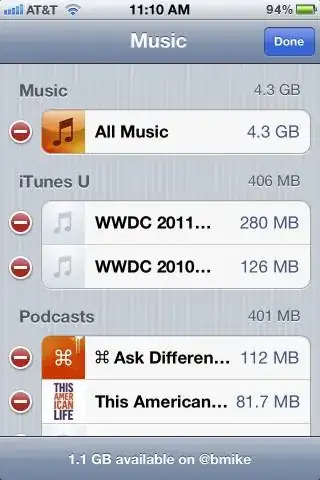
Usage shows how much space each app is using

Settings -> General -> Usage

iOS 5 now collects the space used by apps and the data in the app - sorted by the largest size. If you need to free up some space quickly, this is a great way to easily identify and remove the largest burdens on your storage space.

Of specific tiny note, the edit button in the top right allows you to delete selective content from apps like Music.

bmike
  • 235,889
Kyle Cronin
  • 23,242
  • 21
  • 83
  • 143
66

Retractable Keyboard in Messages.app

The neat way that you can scroll down on iMessages and it pulls the keyboard down with your finger.

Jason Salaz
  • 24,471
orta
  • 121
  • Oh WOW. That is awesome! I hadn't even been in a position to use that yet! Great obvious addition you'll see as soon as you have to review a previous message in the conversation. Very neat! – Jason Salaz Oct 15 '11 at 23:04
  • 13
    This. As small as it seems, I desperately wanted this feature. Big help when your best friend sends you 1500-word rants via text message. :) – Dan J Oct 16 '11 at 11:57
55

Undo Close Tab

In Safari on the iPad, tap and hold the [+] button to display a list of recently closed tabs instead of creating a new empty tab.

Jason Salaz
  • 24,471
Bart M
  • 1
  • 1
  • 2
52

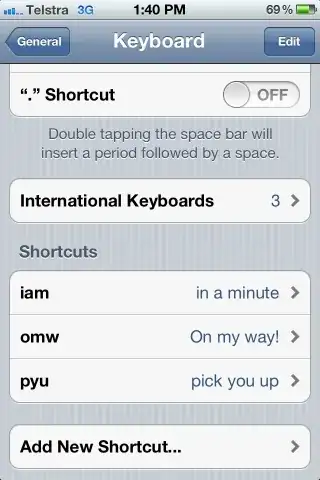
Keyboard shortcuts

I wanted this for a long time.

Jason Salaz
  • 24,471
ocodo
  • 1,673
49

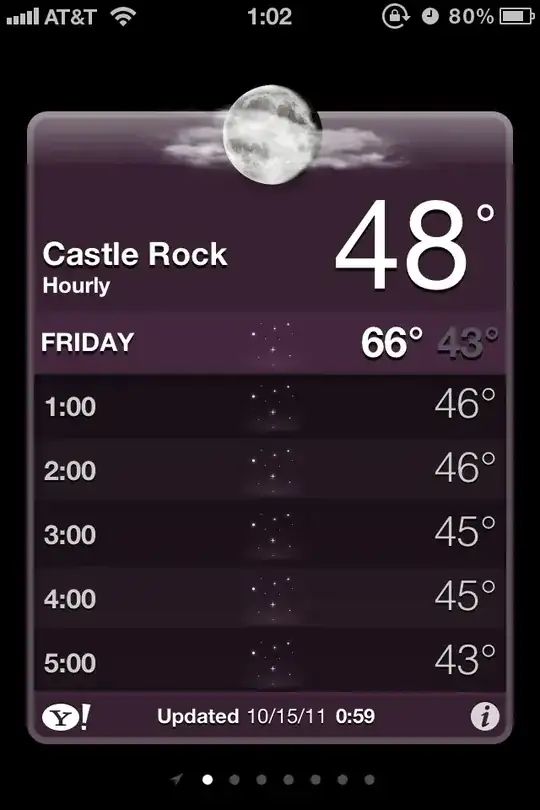
12 Hour, Hour-by-Hour forecast

When viewing Weather.app, simply tapping on the screen/6 day forecast will slide the days downward, and reveal a 12 hour, hour-by-hour forecast!

Note also that "Hourly" illuminates underneath the city name when in this mode.

Jason Salaz
  • 24,471
49

Read those long song titles and artist/album names

You can tap and hold on a song/podcast title to get a pop-up of the entire description.

Jason Salaz
  • 24,471
huseyint
  • 101
  • I don't understand this feature. It only shows information that's already visible in the list. Strange. Of its unfinished, doubly strange. –  Oct 18 '11 at 05:33
  • 1
    @cksum: Well kind of. You can see the title of the song was truncated so the popup shows all the song info. – styfle Oct 18 '11 at 06:20
  • 5
    Moreover, it now also shows the full title when displaying the currently playing song's cover art using a marquee. It used to chop it off if it was too long before, making it especially useless for podcasts and audiobook with numbers at the end of the title. Have been complaining about that since iPhoneOS 1.0 – Daniel Schneller Oct 18 '11 at 06:38
  • 1
    Now if this could only be implemented in the iTunes app. So many podcasts prefix the title of the episode with the podcast name and you can't ever tell what the contents of that episode is. – jessegavin Oct 19 '11 at 16:23
48

Swipe Camera to view Photo Roll

When Camera.app is open, and you want to quickly view your previously taken photos instead, don't hit the photo button in the bottom left, simply swipe the screen from left-to-right and you will go in descending date-taken order through your Camera Roll.

Note that you cannot do this if your phone is locked and you used the 'quick camera' method, except for photos taken in that session.

This screenshot was taken mid-swipe (which is rather difficult to do). Note the Camera.app interface on the right half, and a familiar partial screenshot on the left.

Jason Salaz
  • 24,471
47

Good Vibrations

Custom vibration patterns! (Turn them on in Accessibility; tap them out in Sounds; set them by contact in Contacts).

http://9to5mac.com/2011/06/09/ios-5-know-when-wife-is-calling-by-customizing-vibration-patterns/

Jason Salaz
  • 24,471
NateB
  • 1
  • 1
  • 2
46

Maps.app now features alternate routes

When getting directions that encompass a long distance that may have multiple highway routes, you will be able to choose 'Route 1' or 'Route 2' after searching the addresses, and before hitting start. Tapping on the 'Route 1'/'Route 2' tooltips will change the color for that route (light blue/dark blue) and also update the estimated distance and time in the header bar.

Jason Salaz
  • 24,471
  • But does it have voice directions yet? That's the big thing that keeps my wife from using her phone as a navigator. Seems like it would be a natural fit with Siri... – Toji Oct 17 '11 at 21:47
42

Alternative Shutter Button

I love that you can use the volume up button to take a photo. This is great in landscape mode.

Also if you are using Apple's headphone or any headphone that compatible with iOS, using the volume + button from the headphone also can take a photo for you, this is great for remote shutter !

Jason Salaz
  • 24,471
38

Split keyboard on the iPad

Just pull the keyboard apart with your thumbs. The Hide Keyboard button (bottom right) can now be used to reposition the split keyboard on the screen. It takes some getting used to but it can be handy for typing whilst holding the iPad in your hands.

enter image description here

35

Draggable Recipients

You can drag and drop recipients between To, Cc and Bcc in Mail app.

Jason Salaz
  • 24,471
huseyint
  • 101
34

Swipe Individual Notifications

My favorite mini-feature yet: you can swipe any notification on the lock screen.
This will remove the lock and proceed to the relevant app.

Dan
  • 4,998
33

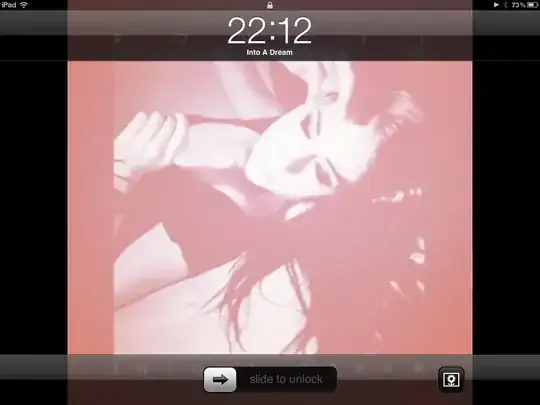
Third Party Audio Apps Can Publish Song Data to Lock Screen / Multitasking Bar

In previous versions of iOS, the lock screen and multitasking bar would simply show the app name that's playing music. But now, if supported in the app/implemented by the developer, full Artist, Album, and Title information can be shown instead.

Note the non-Music.app icon in the multitasking bar.

Jason Salaz
  • 24,471
  • 4
    +1 because (a) I wish my Android phone had a better OEM lock screen and (b) Skrillex – Matt Ball Oct 15 '11 at 19:23
  • 2
    I'm looking forward to Spotify implementing this :) – Espen Herseth Halvorsen Oct 15 '11 at 22:35
  • I saw Soundcloud doing that in iOS 4. – Max Yankov Oct 17 '11 at 13:09
  • I'm fairly certain you didn't. Apps previously had no way to be able to do that. Because apps couldn't "change their name" in order to show something different in the multitasking bar / lock screen. There was no SDK mechanism like there is now to publish this data. – Jason Salaz Oct 17 '11 at 16:46
  • And yet, while soundcloud was playing, I certainly saw soundcloud in the place of ipod icon in the multitasking bar. Not sure about the locked screen, though. – Max Yankov Oct 19 '11 at 09:21
  • 1
    Oh, sorry, I misunderstood. The icon of the currently playing application is not new, that's been around since the multitasking bar existed (iOS 4); the name of the song is the part that is new. – Jason Salaz Oct 19 '11 at 16:35
33

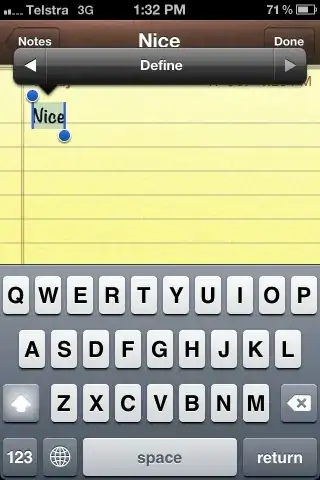
Dictionary

Word definitions from text selections.

Jason Salaz
  • 24,471
ocodo
  • 1,673
  • It's not just text editing apps. It also works on most apps that display text and let you select it such as Safari or the web browser component. – Senseful Oct 17 '11 at 03:00
  • I've updated the answer to put this more clearly, I hurried to get the thing posted with the pics and didn't think about wording properly. – ocodo Oct 17 '11 at 03:14
  • How does this work? I mean, how can I get those "definitions"? – Martin Oct 20 '11 at 16:52
  • 1
    Just tap the right arrow on the copy | cut selected text menu, and there's the define option, or tap left to go back. – ocodo Oct 21 '11 at 01:20
  • It does not work for me. I get the "copy|cut" button, but there are no arrows. iPhone 4, iOS 5, German. – Martin Oct 21 '11 at 07:03
  • Sad it works only when editing text (not when reading).. :( – The Student Jan 06 '12 at 14:52
29

Current Volume Reminder

Switching the phone from Silent mode back to normal now displays the current ringer volume.

Jason Salaz
  • 24,471
Dan J
  • 5,721
28

6 day forecast in Weather Widget for Notification Center

When in the Notification Center drawer, you can swipe the Current Weather widget in either direction to switch between Current Local Conditions, to the same 6 day forecast you would see in Weather.app. Saves a ton of time!

Jason Salaz
  • 24,471
27

MobileSafari, Mobile Reader

The Reader button in Mobile Safari address bar.

It displays a page not entirely suited for mobile in an easy to read, black-and-white format. It removes all of the extraneous information and focuses on the body text.

EDIT: Something new I noticed recently, if the article has a link such as "Continued on page 2...", the Reader will automatically load the additional pages, allowing you to scroll through the entire article without leaving the Reader.

Hand-E-Food
  • 1,611
  • I was so happy when I saw this. – Dan Oct 17 '11 at 20:54
  • I remember seeing this as a feature for normal Safari and thinking, meh. But on the iPhone this feature is gold! – styfle Oct 18 '11 at 06:18
  • Is this only available on the iPhone 4S? I don't see it on my iPhone 4. Do I have to enable it somehow? – jessegavin Oct 19 '11 at 16:26
  • 1
    @jessegavin, I have an iPhone 4. It seems to only appear on certain pages, usually those with a single article. It doesn't appear if you have a string of blog entries (multiple articles) or a forum listing. Also you have to wait for the whole page to load first. Try a news site so you can see it in action. – Hand-E-Food Oct 19 '11 at 22:08
  • @jesse, It is up to the website developer to “mark” content as an article. Most news websites and blogs already do this, but not all. – Dan Oct 30 '11 at 22:27
  • Per your edit, that's the whole point of Reader mode. Well, it's one of the main two points. (1) Uniform/Clean Presentation, (2) Single Page – Jason Salaz Jan 09 '12 at 02:21
25

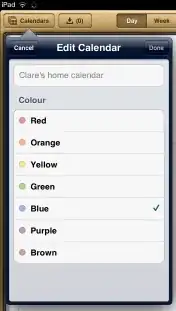
Ability to edit the colours of Exchange calendars

Finally, I can make the colours of each Exchange calendar consistent, without needing to buy a Mac, to use iCal!

To change the colours:

  1. Click on the Calendars button
  2. Click on Edit
  3. Click on the ">" button next to a calendar
  4. Pick the Colour of your choice...

iPad calendar colour-selection dialog

A nice extra touch is that if you use a 3rd-party calendar app, such as Informant HD, the same colours are used there too.

Jason Salaz
  • 24,471
Clare Macrae
  • 1,220
25

Additional Data in Calendar when Rotated

Calendar.app when the iPhone is rotated in landscape mode displays a week mode.

Horizontal scroll iterates through days.
Vertical scroll iterates through hours.

Jason Salaz
  • 24,471
  • 3
    WHOA! I have never seen anyone mention this feature before. This is extremely useful for the first couple weeks of each quarter when I need to see my classes for the week. – styfle Oct 18 '11 at 06:24
24

Emoji for everybody!

Emoji is now a keyboard that can be used by anybody, where prior to iOS 5 it would only be enabled by the use of a Softbank (Japanese Cell Phone Carrier) SIM card in your device, or via special tricks that certain applications would perform.

Enable it by going into Settings -> General -> Keyboard -> International Keyboards -> Add New Keyboard, then scroll about 1/3rd of the way down and tap 'Emoji'.

Emoji are cute little detailed picture icons. These icons can only generally be seen on Apple computers, iPhone users, or most Japanese Cell Phones (albeit they will look quite a bit different on those).

Jason Salaz
  • 24,471
  • 1
    There's a special easter egg for users viewing this answer in Safari, or on an iOS device, only. Chrome users (like myself, unfortunately) cannot see it. – Jason Salaz Oct 15 '11 at 07:42
  • 1
    Perhaps you meant Safari users on Lion. On Safari on SL, I see only the boxes (as with Chrome) – Nivas Oct 15 '11 at 12:59
  • So, as we see here: This is fun, but beware that sending an email with emoji in it will result in little boxes for the recipient unless he is using iOS or Lion... For example, if he is using Windows. – GEdgar Oct 15 '11 at 20:36
  • 3
    @GEdgar why would you want to email a Windows user anyway?! :P – hairboat Oct 15 '11 at 21:58
  • 1
    E-mailing you at Stack Exchange would mean e-mailing a Windows user :(. – Jason Salaz Oct 16 '11 at 05:07
  • There's nothing particuarly special about those characters - they're just Unicode. They show for me in Linux. For example, character #6 is the example is http://www.fileformat.info/info/unicode/char/1f4a9/index.htm – MikeyB Oct 17 '11 at 21:07
  • 1
    This is 100% true, but the fact that you can input them easily on an iPhone is relatively special :). I mean, I've been entering Unicode on a phone since my Sidekick 2, but this method is 1098530974298712x easier. – Jason Salaz Oct 17 '11 at 22:51
24

Double tapping the home button on the lock screen shows you both media controls, and a camera icon to the right of the unlock swiping track. Not only is the Camera available from the lock screen, but as soon as you push the home button, it whisks you right back to the lock screen. So nobody can get into your iPhone without unlocking it.

Jason Salaz
  • 24,471
  • 1
    I'm not sure what you mean. If the phone is locked, and you tap the camera button it opens up the camera app. But if you then click the home button is takes you to the home screen, not the lock screen – ideasasylum Oct 20 '11 at 11:10
  • 1
    @hopeless That happens to me too, but I think it's a bug. Or maybe it depends on whether you have a pass code set. – benzado Oct 20 '11 at 15:33
  • 1
    Pressing the home button takes you to the lock screen with the pin input panel raised if you have a passcode set. – Jason Salaz Nov 08 '11 at 06:54
23

More convenient "Find On Page" searching

I just noticed that when you're in Safari, and you click in the Search box at the top-right, the keyboard has a new "Find on Page" box, that is much more convenient than the old iOS 4 way of searching.

enter image description here

Edit: 20/10/2011

The Pad Gadget page iPad Quick Tip – Find Text and Keywords in Mobile Safari shows a screenshot from the iOS 4 days. Notice how the "On this page" bit appears after it's searched the Web. My point is that the iOS 5 way is more obvious, and more convenient.

Jason Salaz
  • 24,471
Clare Macrae
  • 1,220
23

Mass Mark as Read/Unread/Flag

You can now mark multiple emails as Read/Unread from the edit mode in Mail without having to open each message.

Jason Salaz
  • 24,471
Dan J
  • 5,721
20

Ringtones (can) Serve Double Duty as Notification Tones

Ringtones that are less than 15 seconds will also show up in the the various other notification types.

New (SMS) Message, Calendar Alerts, Tweet Sent, etc. They can even be defined as the SMS tone for a specific contact in your Address Book.

Jason Salaz
  • 24,471
20

Rename Your iOS Device

I can change my iPod's name without using a computer.

Silly I know, but I can.

Settings.app > General > About > Name

Jason Salaz
  • 24,471
jrg
  • 382
19

Ghost Buttons on the iPad's Split Keyboard

Many have complained about the split keyboard not matching their natural finger choice for the middle letters (TY / GH / VB), but as it turns out, those keys all exist on the both sides of the keyboard. Want to hit Y with your left finger? Do it, it's there, and it's really wide too, easily 3 buttons wide. Want to hit V with your right finger? Do it, same rules apply. It's really amazingly well done.

Hat tip to Finer Things in iOS:

enter image description here

nohillside
  • 100,768
Jason Salaz
  • 24,471
17

Multi-touch gestures on iPad

  1. Pinch to close app
  2. Swipe up with four fingers to show the app switcher
  3. Swipe left/right with four fingers to switch between running apps

I'm finding number 3 less useful so far but 1 and 2 are becoming second nature.

17

Notifications allows control over badge counts

If you prefer icons to be clean and without status - specifically in apps like Mail, notifications allows fine grained control over displaying a badge or not.

Jason Salaz
  • 24,471
bmike
  • 235,889
14

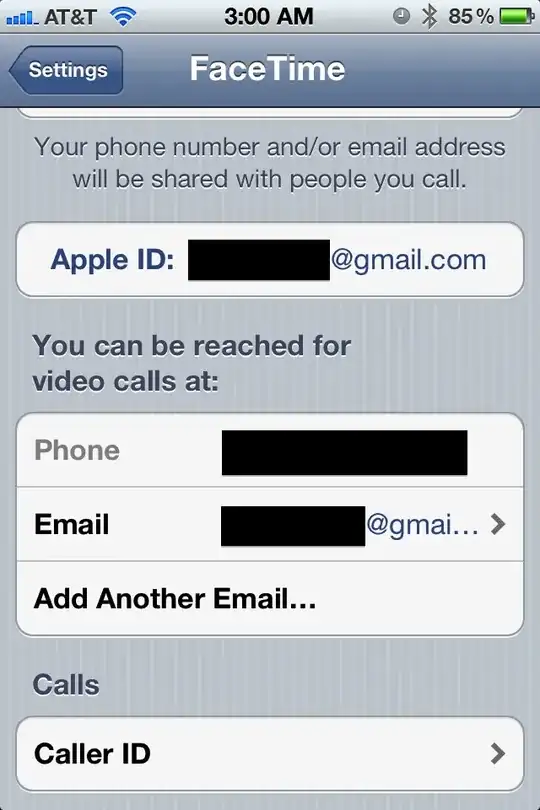
You can send and receive iPhone FaceTime calls via email addresses

This is nothing new to iPod touch or iPad users, but up until iOS 5 iPhone users could only send or receive FaceTime calls with their phone number. Now you can add one or more email addresses to the FaceTime section in Settings to enable people to FaceTime you at those addresses. You can also configure the Caller ID to be either the phone number or any of the email addresses - useful to prevent people you FaceTime with from getting your phone number.

You also have the same flexibility with iMessage as well, the ability to send and receive messages from either your phone number of any number of email addresses.

Kyle Cronin
  • 23,242
  • 21
  • 83
  • 143
13

More dash types

Tap and hold the dash on the keyboard now gives an en–dash (in addition to the -hyphen, em—dash and bullet •). Not very useful but it made me smile :–)

Jason Salaz
  • 24,471
12

iForgot My Password

When signing into the App Store, the "forgot password" button is labelled "iForgot":

Mithical
  • 245
Josh Newman
  • 2,079
  • Hahahhaa. That doesn't seem like a typical Apple thing to do. Some sneaky dev must have put that in there last second. – styfle Oct 21 '11 at 03:23
10

LED Flash on Alerts

I use this in combination with vibrate to wake myself and not the other half.

Settings > General > Accessibility > LED Flash for Alerts

Works best with a transparent or semi transparent cover, ie. they glow with the phone lying flat on a table.

Jason Salaz
  • 24,471
10

Private Browsing Mode for MobileSafari

MobileSafari now has a private browsing mode, turn it on and off under Settings -> Safari. Additionally, it's chrome turns black when Private Browsing is on.

Useful so you can buy your wife presents without her finding out.

Jason Salaz
  • 24,471
Paul
  • 1
10

Lock Camera Exposure+Focus

To keep Camera exposure & focus LOCKED at where you want it, tap the screen & HOLD it until the box pulses.

via @Photojojo

Jason Salaz
  • 24,471
Josh Newman
  • 2,079
10

You can now delete individual items in your call history

When viewing your call history, you can hit "edit" in the upper right and delete individual items from your call history.

via @negrino

Kyle Cronin
  • 23,242
  • 21
  • 83
  • 143
9

Siri can be activated at the lock screen without a passcode

You can use Siri to call, text, and email from the lock screen without a passcode.

Didn't make me smile, but caught me off guard.

Luckily, you can disable Siri at the lock screen by going to Settings-> General-> Passcode Lock turning the Siri switch to Off.

  • 2
    But aint siri an iphone 4S feature rather than ios 5 ? – Viraj Oct 16 '11 at 08:50
  • 5
    Yes, but do we really need an additional thread called "What tiny thing in iPhone 4S makes you smile, or has caught you off guard?" :) – Dan J Oct 16 '11 at 11:58
  • Siri is new to iOS 5. Of course, Voice Control has been like this since, like, iOS 3. And the same tip holds true for it. – Jason Salaz Oct 16 '11 at 18:09
  • 1
    @VxJasonxV Siri is new to iPhone 4S. It's not an iOS 5 feature, otherwise it would be available e.g. for iPhone 4's. There just is no iPhone 4s with iOS 4. – Daniel Beck Oct 16 '11 at 18:38
  • Well heard someone is trying to port Siri to iPhone 4. Can't wait to check it out. – Viraj Oct 21 '11 at 07:44
9

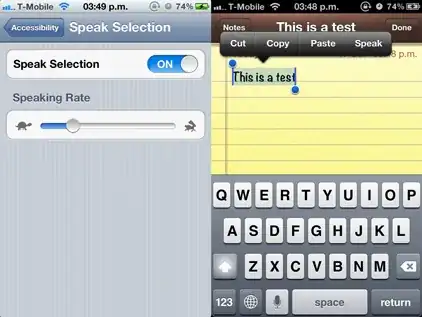
Speak to me (not related to Siri)

One new feature I haven't seen mentioned much is that you can now add a 'Speak' option to every text selection popup, so you can read SMSes or web pages. You can turn it on in the Settings -> General -> Accessibility.

Works on all devices on all selectable text.

Jason Salaz
  • 24,471
  • 7
    Note that this does not require a 4S and has nothing to do with Siri. – Jason Salaz Oct 17 '11 at 23:17
  • 2
    There are a lot of good Accessibility features that no one knows about. – styfle Oct 18 '11 at 06:27
  • Uh, I don't get it. If I can read the screen and select the words I want, then why do I need to have it read aloud? What's the use case for this? – Torben Gundtofte-Bruun Oct 18 '11 at 17:50
  • There are a lot of good accessibility features, which should just be normal features. – Jonathan. Oct 18 '11 at 18:40
  • 2
    @Styfle - "a lot of good Accessibility features that no one knows about" ... ironic that accessibility to the accessibility features is so poor. – ocodo Oct 20 '11 at 03:17
  • @slomojo: Hahaha, I didn't even think about that. It's probably "hard to find" because most people aren't looking for it. These are features I didn't even know I wanted. But out of all the menus in iOS 5, Accessibility is the most cluttered. – styfle Oct 20 '11 at 05:49
  • As Steve Yegge skillfully pointed out in his leaked google+ post, Accessibility is really important, and doesn't really mean what we tend to think it does... Accessibility is every way that humans interact with computers. – ocodo Oct 21 '11 at 01:23
8

Additional "Clear Skies at Night" Icons in Weather.app

When in 12 hour forecast mode, or when it is the night time, there are new icons in the forecast area that resemble a starry sky, as opposed to a daytime sun, indicating clear weather.

Jason Salaz
  • 24,471
  • I actually don't like this feature. The moon without clouds is more parallel to the sun. And the first time I saw the stars, I thought it was snow. Which was very confusing, since it's still 84F here. – Emily Oct 17 '11 at 13:39
  • You know, I'll agree with you on that second part, I too thought it said snow, which isn't unreasonable for Colorado in this season :). I still like the stars though. – Jason Salaz Oct 17 '11 at 16:51
  • Looks like snow to me.... – Sebastian Good Oct 18 '11 at 04:37
8

Swiping right when reading e-mail displays message list in portrait mode on iPad

You no longer have to reach for the top left button to show that list.

If you do not wind up selecting a message, a simple swipe left in the message content pane, not in the folder/message list, will retract it.

bouke
  • 1,227
8

Find My Friends

For parents of a teenager, this is a great way to track where the kids are.

The ability to remove the app or remove 'friends' can be restricted with parental restrictions. This combo alone is worth getting the kid an iPhone.

"I see you're 1 mile from Home Depot. Please get me a box of 2" drywall screws." Creepy. I know. But we got used to caller ID quick enough.

Jason Salaz
  • 24,471
  • Note that you can use parental controls to enforce this, actively prevent them from changing options. – Jason Salaz Oct 17 '11 at 16:44
  • I want to +1 this for the example alone, but Find My iPhone is not a new iOS 5 feature :(. – Jason Salaz Oct 17 '11 at 16:54
  • This answer can be changed to the Find my Friends app instead, which is new with iOS 5 and actually better for tracking teenagers anyway. You can mention that the ability to remove the app or remove 'friends' can be restricted with parental restrictions. – Kyle Cronin Oct 17 '11 at 17:03
7

In-app Download Progress Indicators

Podcasts that are downloading are shown in the Music app with a circular completion icon that fills clockwise until the download completes at the 12 o'clock mark. This may also apply to albums/songs.

Jason Salaz
  • 24,471
Kalamane
  • 847
6

Pause a Timer

I really like the pause button for timers in Clocks.app. A tiny little thing, but so much nicer than having to change the timer to the nearest minute, and restart.

Jason Salaz
  • 24,471
penguinrob
  • 3,342
5

Long track titles, artist names, album names scroll to display the full title

In the example below, the full title of the song is "One Sunday Morning (Song for Jane Smiley's Boyfriend".

Long track title scrolling example

4

Easily view a location in a calendar event

The Location field in a Calendar event links to Maps.app provided there is enough information for the data detector to recognize it as an address.

Jason Salaz
  • 24,471
Josh Newman
  • 2,079
4

You can actually backspace on the numbers you enter in Calculator, instead of having to clear them all.

Just swipe horizontally on the numbers on the display: it will remove the last entered number.

Pretty nifty.

wxs
  • 938
  • 1
    I was going to command and say "surely you mean right to left" as would be expected with any another app, but after opening Calculator.app I realized that the numbers do come out FROM the right. However, I will note that swiping in either direction (left to right OR right to left) will remove a number. Awesome! – Jason Salaz May 16 '12 at 22:04
4

Double tap screen in camera video mode to change aspect ratio to widescreen. I have yet to confirm, but this may only work on the iPhone 4S.

RegDwight
  • 107
Josh Newman
  • 2,079
3

Photo Edit Rotation

In the Photos app, you can rotate by any degree, not just at specific intervals, by pressing crop and then using two fingers to rotate the image.

Jason Salaz
  • 24,471
Jonathan.
  • 4,257
3

Landscape Orientation Lock on the iPhone

On the iPhone you can lock the orientation into Landscape by doing this once:

  • Going to Settings.app → General → Accessibility
  • Setting Triple Click Home (the bottom setting) to AssistiveTouch

Then when you want to set orientation lock:

  • Enable Portrait Orientation Lock from the multitasking/app-switcher bar
  • Triple press the home button
  • Press the white circle that appears
  • Press Device
  • Rotate Screen
  • Choose which orientation to lock to.
  • Press the home button 3 times again to get rid of the white circle/overview.

An annoyingly overlong but sometimes useful ability, that should have implemented by default.

RegDwight
  • 107
Jonathan.
  • 4,257
3

View third-party app art at Lock Screen exclusively

When using an app that publishes song information/cover art to the lock screen (e.g. Music.app, Spotify), you can tap anywhere on the Lock Screen except an actual lock screen element (bars, unlock slider, etc.) to hide all of the lock screen's bars and other information in order to have a clean picture of nothing but the cover art, taking the place of your lock screen wallpaper.

While playing music via Spotify, the lock screen normally:

Lock screen with Spotify playing music

After tapping the background (tapping any of the bar areas will not work):

Lock screen with interface chrome removed

Note:

  • This appears to be an iPad-only feature.
  • You cannot do this when your normal lock screen wallpaper is shown.
Jason Salaz
  • 24,471
3

In iOS 5.1 you can swipe up on the camera icon in the lock screen to take a photo - most people know that. However you can also swipe down to re-lock the phone once done with the camera.

via http://www.quora.com/iOS-5/What-are-the-best-new-features-on-iOS-5-users-probably-havent-discovered-yet/answer/Ron-Levy

Josh Newman
  • 2,079
2

Bluetooth Volume Control, and Bluetooth Text Display

Simply that the volume control on my stereo bluetooth headphones now actually controls the volume of my iPod Touch - AND the currently playing track is displayed on the Bluetooth module. Looks like they've sorted that one good and proper!

Jason Salaz
  • 24,471
james
  • 1
2

Unified Single Caller Log

I'm not sure when this happened, but I only just noticed it, but when viewing the recent calls list, of you click the little arrow next to the caller name on the right, you get a detailed list of the relevant calls. This was there before, but only showed completed calls, not is shows cancelled calls where you hung up before receiving an answer or voicemail. Using for proving you tried to call, although it won't show "call failed", it will show cancelled in it's place where a call did actually fail, like for me earlier today...

Jason Salaz
  • 24,471
stuffe
  • 25,668
  • In older versions of iOS, this would only show you "closely related" call times (within maybe a rolling half hour?). That amount of time appears to have been raised dramatically. – Jason Salaz Nov 08 '11 at 06:49
  • If only they would timestamp each SMS too... – stuffe Nov 08 '11 at 10:38
2

Quickly access most recent draft email

Hold the compose button to bring up the most recent draft email

(via http://obamapacman.com/2012/02/how-to-quickly-save-access-saved-mail-draft-on-iphone-ipad-ipod-touch/)

Josh Newman
  • 2,079
1

The Immortal Newsstand

Newsstand caught me off guard, but then in a bad way. It caught me off guard because I was not expecting Apple to add a feature I cannot remove or even move to another folder without "cheating".

0

iMessage supports animated gifs!

But unfortunately as of iOS 5.0.1 only animated within the message bubble - it is not animated when you tap/select the image to view full screen.

Josh Newman
  • 2,079
0

Music fades in volume but continues to play when a phone call is received — this appears to be added in iOS 5.1.

RegDwight
  • 107
Josh Newman
  • 2,079
  • On further use this may be a bug as it doesn't seem to always happen (reliably or consistently), or only a partially supported feature. Trying to get to the bottom of this: https://discussions.apple.com/thread/3836857 – Josh Newman Mar 28 '12 at 18:25