Is there a way to disable "use safari suggested password" shown below, without disabling autofill? 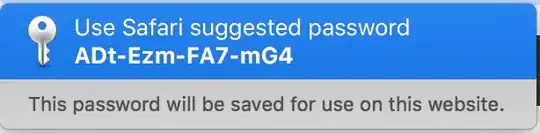
Asked
Active
Viewed 5.0k times
40

Bilal Syed Hussain
- 1,024
-
4Just start typing instead, it will vanish. – Tetsujin Nov 23 '16 at 15:30
-
@Tetsujin while that works, I was wonder if there is a way to disable it since I never use it – Bilal Syed Hussain Nov 24 '16 at 00:45
-
2This misbehavior makes it very problematic to use my third-party password manager to create and store passwords. – Andrew Wolfe Feb 02 '19 at 17:20
-
1Agreed, frequently it overwrites the generated password I just got from 1Password with its suggestion, which is infuriating. – chrispix Mar 19 '19 at 23:34
-
For those who navigate primarily by keyboard, the escape key dismisses the jarring prompt. – 2540625 Jan 21 '20 at 01:19
3 Answers
32
The correct answer is: there is no way to disable the suggested passwords "feature" without completely disabling auto-fill.

user1652628
- 421
3
At least as of MacOS Ventura, it is possible to selectively turn off password suggestions without completely turning off autofill:
Safari > Settings > Passwords > Autofill > [unselect "User names and passwords"]


Scully
- 31
-13
Safari->preferences->passwords, delete those you do not want.

LexS
- 1,451
-
6The question isn't about auto-filling existing passwords, it's about automatically creating new passwords. – Calion Dec 04 '19 at 16:48