0

I can't reinstall El Capitan from AppStore because of this:
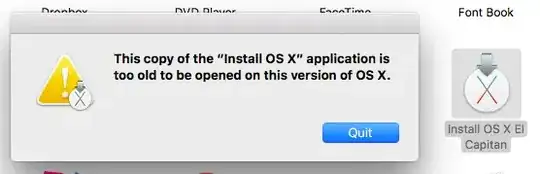
error dialog

and CmdR only suggest to reinstall macOS Sierra.

Allan
  • 101,432
  • 7
    Golden Rule - don't put a beta OS on a mission-critical machine. Use a clone, because even Time Machine cannot roll back to an earlier OS, unless you take the precaution to remove it as you update. – Tetsujin Jun 14 '16 at 11:53
  • 2
    In addition to the Golden Rule mentioned, one should not upgrade to a new OS without first knowing how and what it takes to revert to the previous OS and have the tools necessary in place before preforming the upgrade! – user3439894 Jun 14 '16 at 12:44
  • if you switch off SIP (System Integrity Protection), this older solution here on AskDifferent should still work: http://apple.stackexchange.com/questions/159419/install-mavericks-on-second-partition-in-yosemite-only-system/159556#159556 – Redarm Jun 15 '16 at 17:33

5 Answers5

5

macOS is not designed to be downgradable, and as such you cannot downgrade it through an installer like this. You will need to create a bootable install disk (Apple support), e.g. by running

sudo /Applications/Install\ OS\ X\ El\ Capitan.app/Contents/Resources/createinstallmedia --volume /Volumes/MyVolume --applicationpath /Applications/Install\ OS\ X\ El\ Capitan.app 

to install on a drive called MyVolume. Running this will lose you all your content, so you will need to have a backup if you want to retain your files. Otherwise, wait Sierra out…

klanomath
  • 66,391
  • 9
  • 130
  • 201
1

The preferred way is to do a Restore from Time Machine. Your next option is to do a clean install OS X from USB or other install media; meaning wipe the HDD and install.

Allan
  • 101,432
0

Best way to downgrade to El Capitan:

  1. Make a new partition
  2. Reboot and hold down Command R to start Internet Recovery . This will clean install El Capitan.
  3. After installation, remove the partition of Sierra.

See official documentation of Apple about Internet Recovery

Done.

Allan
  • 101,432
rwzdoorn
  • 1,271
  • The Title of the question clearly states "without time machine". – user3439894 Jun 14 '16 at 11:20
  • 1
    Edited, this is the solution WITHOUT time machine. – rwzdoorn Jun 14 '16 at 11:34
  • @Allan, Why did you remove "Option" from the key sequence that rwzdoorn stated? – user3439894 Jun 14 '16 at 12:20
  • @user3439894 Because per the article he linked, it says Cmd+R, not Cmd+Option+R. – Allan Jun 14 '16 at 12:32
  • Well then, iTwister Lex already said "and Cmd R only suggest to reinstall macOS Sierra.", so what good is this answer? Does pressing Command+Option+R give a different choice of OS to install? – user3439894 Jun 14 '16 at 12:39
  • 1
    @user3439894 His tactic is to create a new empty partition (assumes there's space), install OS X there via Internet Recovery, then remove the Sierra partition. I also assume he intends for the user to resize the new partition once done to utilize the full disk, but this is not indicated. – Allan Jun 14 '16 at 13:00
  • Okay, I actually tested this on my Mac - used Time Machine to backup & then CMD + R using the same drive (time machine) worked for me. Although during the process, the drive went off several time, but i tried doing the process all over again & it got me into El Captain.

    Time Machine works, don't know of any other method which is tested & first hand verified.

    – Shritam Bhowmick Jul 29 '16 at 01:22
  • @ShritamBhowmick so this helped you? – rwzdoorn Jul 29 '16 at 08:52
  • @rwzdoom, I exactly didn't use this particular method. I used time machine to backup the entire OS, and it worked. Later I found my macOS Sierra installation files (install files) saved as well in Applications. – Shritam Bhowmick Jul 29 '16 at 10:34
0

Ok so i just bought this macbook pro and i am really good with computers. However, this is my first mac. So the person i bought it from didnt know how to reboot it so i went online.

Command+R brings up the 4 option menu. I erased the hard drive and when i went to reinstall i wasnt able to install el capitan using my icloud id that i have for my ipad. It said temporarily not available.

So i got pissed and shut down the computer as everything i had read had not worked. After shutting it down i turned it back on and a folder with a question mark came on and couldnt get anywhere. Shut it down again.

Restarted it while holding down command+R and the internet system recovery began. Had to connect to wifi. BAMCIS it was that easy to get it to factory settings. It installed OS X LION and i then upgraded to Sierra. Only to realize that Serato Scratch live was not compatible with Sierra as i am running SL1 lol.

Anyways had to go back to OS X LION so same process erase hard drive. Shut down computer. Command+R to start internet system recovery go back to OS X Lion. Pretty simple method if you want to go back without a hastle or got a laptop off someone and are getting the temporarily not available message. Hope this helps.

-1

this may seem like a bit of a hack, but you could try to use Unibeast to create a fresh OS X El Capitan installation disk, and boot your mac from it to install. Here is a step-by-step guide on creating this disk : http://www.tonymacx86.com/threads/unibeast-install-os-x-el-capitan-on-any-supported-intel-based-pc.172672/ This is basically intended for Intel-based PCs but it works like a charm on the Mac to perform rollbacks.

uiguig
  • 27
  • Why all of these down votes ? This works fine and does not need any Time Machine backups! I have already done this, it is straightforward and safe. Please kindly consider avoiding to hold the new members of the community back. – uiguig Jun 21 '16 at 16:35
  • I think the community is mad at the genuine of macOS that it comes shipped with/ – Shritam Bhowmick Jul 28 '16 at 20:32