The Photos app opens whenever I plug in my phone.
How can this be prevented?
I have seen many solutions for the old iPhoto app that involve changing the "Connecting camera opens" option, but the new app has no such option.
The Photos app opens whenever I plug in my phone.
How can this be prevented?
I have seen many solutions for the old iPhoto app that involve changing the "Connecting camera opens" option, but the new app has no such option.
With the iPhone plugged in, open the Image Capture app on your Mac. In the Image Capture window, left lower corner, choose which app should automatically open when you plug in your phone, chose "no application"
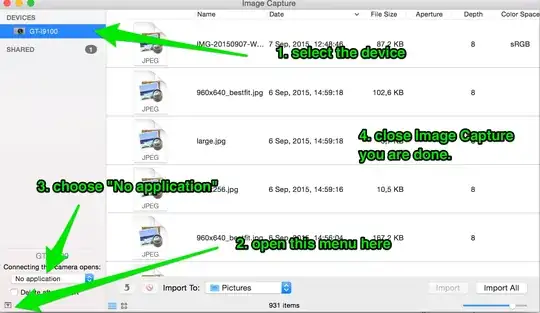


If you like the command line or need to have all devices not open rather than manage each single device as it connects and then after Photos has already opened, try:
defaults -currentHost write com.apple.ImageCapture disableHotPlug -bool YES
This sets a flag to tell the system to not activate ImageCapture or Photos or iPhoto when a hot plug of an iOS device is detected.

Plug in your phone and let Photos load. Then note check box in the Photos window and uncheck it:


Just launch iPhoto, it's still in your Applications folder (if not try the Purchases tab in the Mac App Store app). The same old "Connecting camera opens" option is still there and still works.


