1

I'm using separate magic trackpad and (still, but that's not a requirement) Mac OS 10.9.5. I'm looking for some convenient and free way to decrease tracking speed on demand, for example via additional gesture or a keystroke.

I'm a developer, so, quite often I need to precisely move cursor one-two pixels aside while inspecting layouts, picking colors, moving panels here there and currently with magic trackpad that's terrible.

One of good options I'm looking looks like this: scrolling while holding a key produces slow and precise mouse pointer movement.

Tried to search, but not very successfully:

  • MagicPrefs: nothing like that, but, seems some plugin may achieve that.
  • SmoothMouse: nope.
  • SteerMouse: paid, does not support Apple Magic Trackpad.
  • ControllerMate: paid, looks like this is what I need, but I didn't manage to achieve what I want (too much time spent).
  • iMouseFix: nope.

As an option I could make some script up and bind it to the keys, which will change tracking speed or an entire app, but I'm not sure about that and consider that as a last resort. Don't like additional mouse option for precise movements, also I rarely use macbook's built-in trackpad, so I need something universal.

  • 1
    If You want to be very precise You can zoom in the screen and "see pixels" more clearly - mouse pointer also moves slower in this mode. You can enable this in Preferences -> Accessibility -> Zoom. By default You hold ⌃ CTRL and then scroll. – Mateusz Szlosek Mar 27 '15 at 09:16
  • Great suggestion, thanks, will solve some use cases! Yet it is not sufficient, sometimes It's not suitable, I need to see the whole picture while performing precise cursor movements. For example, while moving xScope guides or dragging UI elements in UI designer. – MANIAK_dobrii Mar 27 '15 at 09:56

1 Answers1

2

BetterTouchTool is the free tool of your choice:

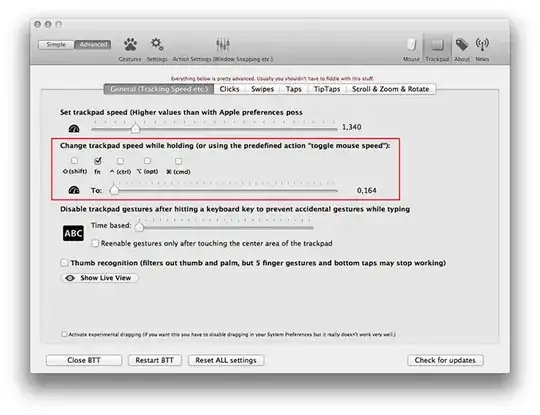
With a simple modifier key you may decrease or increase tracking speed temporarily after configuring the different speeds:

enter image description here

To toggle cursor speed, create a new gesture (optional with a modifier key) or a keyboard shortcut (no screenshot here - just choose the keyboard menu instead of the trackpad menu) and choose the predefined action -> Other Mouse Actions -> Toggle Mouse Speed.

enter image description here

I don't own a Magic Trackpad but this works at least with my MacBook Pro trackpad.

klanomath
  • 66,391
  • 9
  • 130
  • 201
  • I'm using BTT for a long time and I completly forgot about this option! Sadly speed "0" is still "fast". – Mateusz Szlosek Mar 27 '15 at 12:15
  • @MateuszSzlosek Until now I sadly haven't found any way to slow down the cursor movement even more - except some substances modifying the perception. – klanomath Mar 27 '15 at 13:17
  • I'm not the OP, maybe this speed is acceptable for MANIAK_dobrii :) – Mateusz Szlosek Mar 27 '15 at 13:22
  • @MateuszSzlosek I know that you are not the OP ;-) – klanomath Mar 27 '15 at 13:23
  • Brilliant! The only issue now is that zero speed is still too fast. Playing with defaults to shift bottom bar below zero somehow, but yet no great success in that. Anyway, that's the best solution so far. – MANIAK_dobrii Mar 27 '15 at 13:36
  • @MANIAK_dobrii If you first zoom in with the ctrl key (like proposed by Mateusz) and then use the modifier key, the cursor seems slower because the content pixels are bigger... – klanomath Mar 27 '15 at 16:47
  • The issue is also is that precision drops if you're holding a right mouse button (i.e. push magic trackpad and pan) and at the same time unable to use ctrl+scroll. But, seems something could be worked around that. – MANIAK_dobrii Mar 30 '15 at 07:50
  • Better Touch Tool is no longer free. And here is the new website: https://folivora.ai/ – Rowe Morehouse Sep 30 '20 at 23:00