How can change video container from .mov to .mp4 without touching the video itself? Preferably a GUI app.
I have a bunch of videos in .mov and since .mp4 is more widespread I want to use that, but I don't want to lose any quality.
How can change video container from .mov to .mp4 without touching the video itself? Preferably a GUI app.
I have a bunch of videos in .mov and since .mp4 is more widespread I want to use that, but I don't want to lose any quality.


You could do that with ffmpeg:
ffmpeg -i video.mov -vcodec copy -acodec copy video.mp4
This will just change containers, but obviously will only work with a codec that ffmpeg supports.
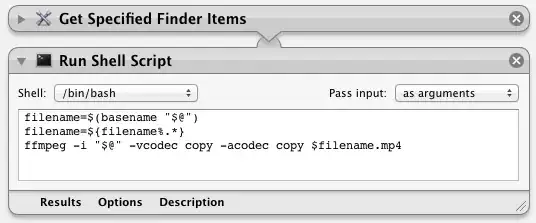
Edit: if you absolutely need a GUI, you could use Automator to create a Drag & Drop target, like this:

It is also known as rewrapping.
Open the file with MPEG Streamclip (freeware, adware-free) and choose File > Save As…, then choose the format: MP4.

