3

Is there any way to create custom keyboard shortcuts that do whatever you want through a third-party app or just through default OS X apps, like Automator and or AppleScript?

I want to create a shortcut that will bring up the power dialogue box, as shown in the image below.
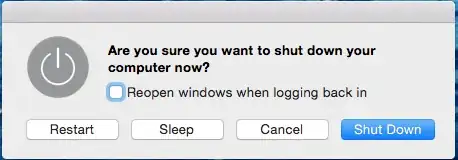
Power Dialogue Box

user3439894
  • 58,676
Tre S
  • 1,706

2 Answers2

8

Assuming you're on a normal Mac then the power button will bring it up. Details here.

Further details about creating shortcuts here.

You can use the info in that document to create a short-cut in any app for whatever key combo you want for the Shutdown... item.

Simplified procedure:

  1. Open System Preferences -> Keyboard -> Shortcuts tab
  2. From the left, click App Shortcuts.
  3. Click +
  4. Choose 'All Applications' as the app
  5. Choose 'Shut Down...' as the command
  6. Put in whatever shortcut you want.
Tetsujin
  • 115,663
Alex
  • 9,600
  • Just a comment on the "Simplified procedure:", this does not bring up the same shutdown dialog box as shown in the OP, under OS X 10.8.x anyway. Also Finder has to have the focus as well otherwise it doesn't trigger. – user3439894 Mar 01 '15 at 23:12
  • Don't use Finder, use Any. – Tetsujin Mar 02 '15 at 13:22
  • @Tetsujin - yes, good call. Updated. – Alex Mar 02 '15 at 17:24
  • Sorry, meant all apps [was on my phone] I re-edited – Tetsujin Mar 02 '15 at 19:25
  • in fact @user3439894 is correct, it's a different dialog, no options. Steve's answer is actually closer to what the OP wanted, in fact. I missed that earlier, sorry all. – Tetsujin Mar 02 '15 at 19:28
  • Well, I covered that case in the initial sentence - however, many users have custom keyboards, especially desktop users. – Alex Mar 02 '15 at 23:41
  • i am unable to input anything in the Keyboard shortcut field. Is this normal? I cant seem to make this work, please help – Kalamalka Kid Jan 02 '18 at 08:39
  • You are my Savior. Google changes the name of the action AGAIN and I'm using your answer 3 times already. Still working – Arseniy-II Sep 08 '22 at 11:27
4

On my 2013 MacBook Pro with Yosemite control + eject does fine for bringing that dialog up.

As an aside, the behavior of the power button has become a bit fiddly (annoying...) for me.

  • Even though I didn't get to make a custom shortcut you still helped a bit. – Tre S Mar 19 '15 at 01:39
  • [control] + [power] works similarly on new Macs where the power button is in the place of the old eject button. You'll have to hold it down a bit as it has a time delay (like [caps lock]) so you don't press it accidentally. – intcreator Jan 19 '16 at 18:28