12

How do I make

+ and + move the text cursor very left and right of the terminal entry line. This keyboard shortcut works on most things on my mac book but not the Terminal.

Usually I use the home and end keys on other non apple computers. Strangely enough +A and +E achieve this in the mac terminal but it is the wrong key combination in my opinion. I want to do it using + and +.

It is similar to this question, however I want to specifically map it to + and +.

Can home and end keys be mapped when using Terminal?

Robbo_UK
  • 325
  • 2
    At the risk of sounding like a purist: ⌃+E and ⌃+A are the right ones, and ⌘+← and ⌘+→ are wrong. The E and A also work everywhere else in standard Mac text editing places, and on every Linux, Unix and BSD. – John Keates Sep 24 '16 at 09:48

2 Answers2

6

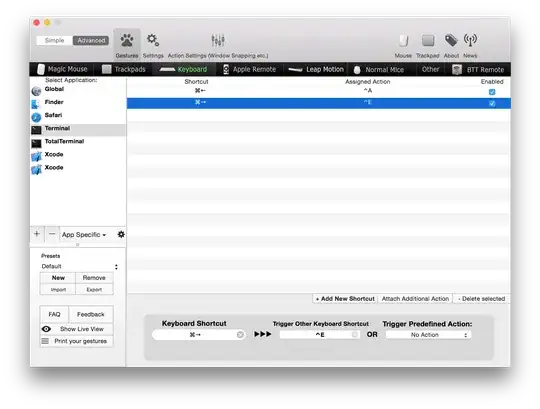
You can use Better Touch Tool for this (it's no longer free, 5$ minimum), just assign keyboard shortcuts to work in Terminal app only. Remap ⌘ CMD+ to ⌃ CTRL+A and ⌘ CMD+ to ⌃ CTRL+E. Here's the sample:

enter image description here

4

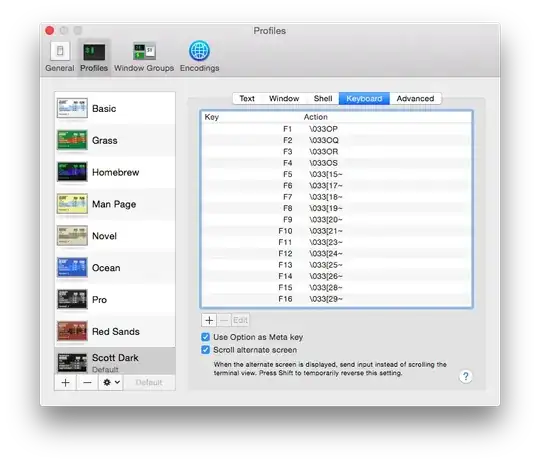
You can adjust the keybindings in Terminals preferences under Profiles -> Keyboard. This is on a Profile by profile basis. Map Esc+OH (\033OH) to the Home key to goto the beginning of a line and Esc+OF (\033OF) to the End key to go to the end of a line.

Terminal Preference

ivan_pozdeev
  • 105
  • 3
sdmeyers
  • 2,349
  • 14
  • 13