4

I can't all of the sudden turn on WiFi on my MBP. I have upgraded to Yosemite half a year ago and it was all working fine until today.

I tried some tips from this thread Can't turn on wifi on Mac OSX Mountain lion MBP 2012 like sudo ifconfig en# up(tried all numbers because I don't know which en is WiFi...

I also tried hard power off; restarted several times; removed WiFi interface, restarted and added it back. Nothing helped. After hard power off I saw it trying to connect to a network for few secs and then it stopped again...
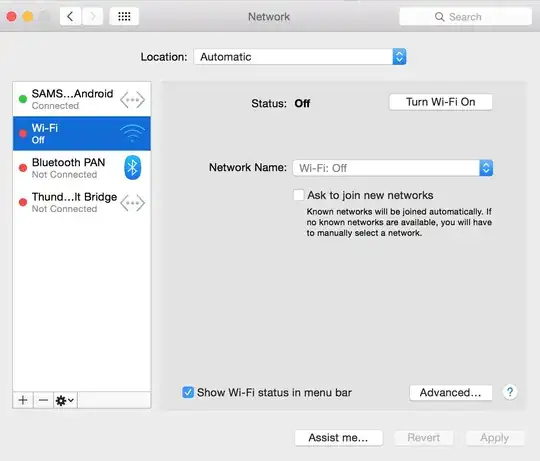
When click <code>Turn Wi-Fi On</code> nothing happens

ifconfig output for wifi device:

en0: flags=8863<UP,BROADCAST,SMART,RUNNING,SIMPLEX,MULTICAST> mtu 1500
    ether 60:03:08:97:7a:56
    nd6 options=1<PERFORMNUD>
    media: autoselect (<unknown type>)
    status: inactive

Console output after system startup:

31/01/15 22:46:33,000 kernel[0]: AirPort: Link Down on en0. Reason 8 (Disassociated because station leaving).
31/01/15 22:46:33,000 kernel[0]: AirPort_Brcm4360_P2PInterface::init name <p2p0> role 1
31/01/15 22:46:33,000 kernel[0]: AirPort_Brcm4360_P2PInterface::init <p2p> role 1
31/01/15 22:46:33,000 kernel[0]: AirPort_Brcm4360_P2PInterface::init name <awdl0> role 4
31/01/15 22:46:33,000 kernel[0]: AirPort_Brcm4360_P2PInterface::attachToBpf name <awdl0> role 4 successful attach to bpf type 147
31/01/15 22:46:33,000 kernel[0]: AirPort_Brcm4360_P2PInterface::init <awdl> role 4
31/01/15 22:46:33,686 airportd[30]: airportdProcessDLILEvent: en0 attached (up)
31/01/15 22:46:35,000 kernel[0]: AirPort: Link Up on awdl0
31/01/15 22:46:39,000 kernel[0]: AirPort: Link Up on en0
31/01/15 22:46:39,000 kernel[0]: AirPort: RSN handshake complete on en0
31/01/15 22:46:39,653 airportd[30]: -[CWXPCConnection performScanWithChannels:ssidList:legacyScanSSID:includeHiddenNetworks:mergeScanResults:maxAge:maxMissCount:maxWakeCount:maxAutoJoinCount:interfaceName:waitForWiFi:waitForBluetooth:token:priority:reply:]: !!! SCAN request received 0.0127 seconds after previous scan request from 58 (locationd)
31/01/15 22:46:39,000 kernel[0]: AirPort: Link Down on en0. Reason 8 (Disassociated because station leaving).
31/01/15 22:46:40,005 airportd[30]: _handleLinkEvent: WiFi is not powered. Resetting state variables.

Does anyone have any clue how to fix it?

I'd prefer a solution that doesn't include reinstalling my whole system.

simPod
  • 185
  • Run this command first to know which interface is which: networksetup -listallhardwareports. Include this information within your original question before shooting at random. You might hurt something :). – dan Jan 31 '15 at 19:20
  • The question you quoted is poorly exposed and didn't get a correct answer. Could you include a screen capture of your Network Preferences...? – dan Jan 31 '15 at 19:31
  • so it's en0 and I have added the screen – simPod Jan 31 '15 at 20:38
  • Could you turn off your Android connexion (I bet it is awdl0 on which your kernel has already turned on AirPort). And when the button on its left is red, just turn Wi-Fi on. – dan Jan 31 '15 at 23:15
  • we tried that with @Buscar웃 in comments below, but it didn't help – simPod Jan 31 '15 at 23:21
  • Was the button on the left red? – dan Jan 31 '15 at 23:24
  • Yes. It has nothing to do with Samsung. It stopped working without it. I just connected it to get online – simPod Jan 31 '15 at 23:25
  • Could you please run this further test: turn off your Android connexion (on your Mac), confirm the button on the left of Android interface is red, turn off Wi-Fi & Bluetooth on your Android. Then turn on Wi-Fi on your Mac and report all the messages logged during this last step within /var/log/system.log. – dan Jan 31 '15 at 23:30
  • Here it is http://pastebin.com/tZr67xHG – simPod Feb 01 '15 at 00:13
  • Feb 1 01:10:35 Simons-MacBook-Pro kernel[0]: hfs_mark_inconsistent: Runtime corruption detected on Macintosh HD, fsck will be forced on next mount. Feb 1 01:10:42 --- last message repeated 1 time --- means your file system on disk Macintosh HD is corrupted. Please boot from an external disk or from the recovery partition (this will be risky with a connection problem) and completely check your internal disk before trying to corrupt it any further. Nothing can be analysed on a corrupted file system. – dan Feb 01 '15 at 10:52
  • So the best thing I can do is clean install right? – simPod Feb 01 '15 at 11:18
  • Not at all :(! Just repair your filesuystem. – dan Feb 01 '15 at 11:23
  • ah ok I get it. I'll do that. Disk Utility also says it needs repairing... Thank you. Another funny thing is that I changed my location – travelled c:a 200km and my WiFi went back up. Now I'm confused o.O – simPod Feb 01 '15 at 23:15
  • 1
    You don't have to be confused. You don't have yet any evidence of a real Wi-Fi problem. Just repair your file-system. Immediatly after, make room on your disk so that the system could run at ease. – dan Feb 03 '15 at 09:55
  • was that helpful? I'm having the same issue – Ante Sep 29 '15 at 12:31

2 Answers2

1

Try following in your Terminal:

Manually connect to WiFi

Turn On

networksetup -setairportpower en0 on

Find

/System/Library/PrivateFrameworks/Apple80211.framework/Versions/A/Resources/airport scan

Connect

networksetup -setairportnetwork en0 WIFI_SSID_I_WANT_TO_JOIN WIFI_PASSWORD

It also shows it is using your Samsung as network provider, so turn it off first then check again if wifi comes on.

Ruskes
  • 48,129
  • It says You cannot join a network when Wi-Fi power is off. – simPod Jan 31 '15 at 20:40
  • so the first line did not turn it on ? (it does not show the wifi icon) please look in the console log for Airport issues. Do you have other network connections, if yes disconect them. – Ruskes Jan 31 '15 at 20:42
  • No, it probably didn't... Do you mean what terminal says by console log? When I run those 3 commands, the first thing it says was the line mentioned above – simPod Jan 31 '15 at 20:45
  • nope, not in Terminal, open the Console in your utility folder then type airport in the search. You might have a hardware problem, so use the Apple Hardware test. – Ruskes Jan 31 '15 at 20:54
  • I see, didn't know that tool. After putting your commands, it says: airport[1662]: Error: Scan failed (82). Apple Diagnostics says No issues found. I have added Console output after system start into the first post. – simPod Jan 31 '15 at 21:55
  • great, thanks for the info, could you disconnect your Samsung phone for a while to test. make sure it does not shows in your network as connected. – Ruskes Jan 31 '15 at 22:15
  • Of course but then what after I disconnect it? – simPod Jan 31 '15 at 22:17
  • I think it is telling you that you are using your Samsung to get to the network and it wont let you use the wifi. So just turn it off 8Samsung) and try now. – Ruskes Jan 31 '15 at 22:18
  • I'm using it as it's currently the only way how to get my MB online :) when I disconnect it nothing happens, still the same issue – simPod Jan 31 '15 at 22:20
  • as long you are on internet using Samsung the WiFi will not tun on. – Ruskes Jan 31 '15 at 22:22
  • I've already disconnected the Samsung phone, nothing changed – simPod Jan 31 '15 at 22:24
  • now run the set of commands in Terminal, starting with Turn on, and check if the WiFi icon comes on – Ruskes Jan 31 '15 at 23:04
  • Unfortunately, there's no difference :( – simPod Jan 31 '15 at 23:07
  • sorry, I can not help you further, someone might. – Ruskes Jan 31 '15 at 23:09
0

We have the same MBP if you have the 13" model. [Thankfully I have no issues yet.]

I guess you did not install anything weird on the system or messed up any setting etc. Based on this premise:

  • First and foremost, which version of Yosemite are you using? It is known that some of the initial versions had some Wi-Fi connectivity issues/bugs. Make sure you are using the latest version, i.e. 10.10.2 currently.

  • If problem still exists, you can try resetting the PRAM and SMC of your machine.

  • You can also check the Wireless Diagnostics to see if you can get any extra info.

If none of these work, wait for another answer or go directly to Apple (or both).

oa-
  • 7,716
LyK
  • 780
  • It happened on 10.10.1 and I updated to 10.10.2 an hour ago and the problem persists. Wireless Diagnostics says I should Turn on wireless :D I'll try PRAM and SMS reset and than Apple... Will post if it worked – simPod Jan 31 '15 at 20:50
  • No use for the PRAM mantra. As will prove you the basic command nvram -p, there isn't anything about AirPort or Wi-Fi in PRAM. – dan Jan 31 '15 at 23:18
  • @danielAzuelos yes, you are probably right – LyK Feb 01 '15 at 08:54
  • On the other hand a power managment problem might come from the SMC. grep SMC /var/log/system.log might help to confirm this diagnosis. – dan Feb 01 '15 at 10:43