74

I would be extremely grateful to anyone pointing me in the direction of the Mac OS X analogue for the free Windows image-editing software Paint.NET.

Basically the way I use it is I take lots of screenshots for work, then put arrows in there, some ovals and text - it's all for documentation purposes - mainly for Confluence.

The feature I can't live without is the arrows - they have points where you can easily curve them creating a very good visual e.g. for tutorials.

And of course it's great that you can do all of that in a lightweight app, couple of clicks manner.

Dan J
  • 5,721
  • You could try https://krita.org/ Its open source, free, can do tons of things – sydd Jan 29 '21 at 00:15
  • @sydd Krita rather tries to be a replacement for Photoshop, but fails so hard on that. I had a lot of frustration with it to do simple tasks like centering a layer on the canvas, so I wouldn't recommend Krita as paint.NET replacement. It's better on the artistic side. – Martin Braun Apr 26 '21 at 22:12

9 Answers9

52

You can use builtin Preview.app for adding arrows, shapes, text, magnifying glass etc. It's not as lightweight as Skitch mentioned by @jherran, but does the job You need.

enter image description here

  • The preview app is good for quick annotations, but it's no replacement of paint.NET, it doesn't even feature layers. – Martin Braun Apr 26 '21 at 22:07
  • Also I've not found a way to increase the canvas of a Preview image which is a really useful feature when trying to align an image. – yeliabsalohcin Feb 03 '22 at 10:03
  • 1
    @yeliabsalohcin What about Tools -> Adjust Size... – Mateusz Szlosek Feb 03 '22 at 11:35
  • That adjusts the image dimensions (scales it), but it doesn't seem possible to keep the existing graphic the same size and add border in order to re-centre the graphic for example. – yeliabsalohcin Feb 07 '22 at 09:23
  • 1
    @yeliabsalohcin Yea but there's a workaround ;) Select All (CMD+A), Copy (CMD+C), Change Size, place white rectangle on top of the resized layer, Paste original image (CMD+V). I know it's clunky, but for fast and basic image manipulation it does the job. – Mateusz Szlosek Feb 07 '22 at 11:40
26

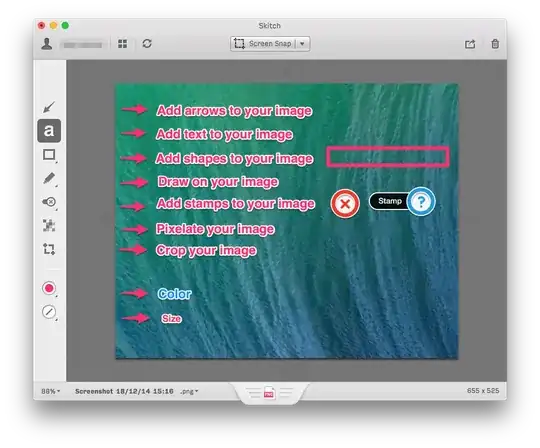
You should try Skitch. It does exactly what you want, take screenshot, put arrows, etc.

Get your point across with fewer words using annotation, shapes and sketches, so that your ideas become reality faster.

enter image description here

jherran
  • 13,284
21

Pinta is a free, open source drawing/editing program modeled after Paint.NET. Its goal is to provide users with a simple yet powerful way to draw and manipulate images on Linux, Mac, and Windows.

http://pinta-project.com/

Carlos
  • 311
  • Thanks for the tip about Pinta! It's looking very promising, is it in active development? Still missing a few primary features important for me, e.g. arrows. I couldn't paste image selection copied from Preview - was getting an error that no image was detected in the clipboard. Will look again at it after a while. – user1249170 Dec 22 '14 at 21:21
  • you may want to look at the versión 1.5 available here :https://github.com/PintaProject/Pinta/releases/tag/1.5 – Carlos Dec 22 '14 at 23:19
  • 2
    FYI: Pinta requires Mono for OS X. – z80crew May 17 '16 at 16:11
  • 9
    Pinta is one of the buggiest pieces of software I've ever used, and it hasn't been updated in years. I strongly recommend avoiding this garbage. – BlueRaja - Danny Pflughoeft Nov 29 '17 at 16:00
  • 2
    After years of no updates, Pinta released a new version in August 2020: https://www.pinta-project.com/releases/1-7 – Tomáš Hübelbauer Aug 23 '20 at 17:36
  • As of 2023, Pinta from PintaProject looks like the closest alternative to Paint.NET, as being a simple light-weight and easy to use Paint program that doesn't look like it's made for a child (I'm looking at you, Patina!) – ADTC Jan 16 '23 at 15:29
  • Yup, as of 2023 it seems PintaProject has picked up steam and is now at version 2.1.1. I had run across this stack thread years ago and settled on Patina which I found usable but with significant drawbacks and a severe lack of more advanced features. I have Photoshop as well but sometimes it just feels too heavyweight for simple editing. I had dismissed Pinta as an option because of the comments here about it's outdated and buggy nature. I'm excited to give it a whirl now and maybe retire Patina. – Daniel Jul 27 '23 at 03:44
14

None, there are none. Paint.net is irreplaceable.

jlansey
  • 305
4

Gimp is a nice alternative. While it is a bit more complicated it can do a ton more

Big_Mac
  • 273
  • 53
    GIMP is actually a massive pain in the ass. They're looking for a Paint.NET alternative, and that is a very, very simple program. – Almo Dec 19 '14 at 00:53
  • 1
    I know I used to use it before getting a Mac and switching to gimp. It does have a learning curve but you can do some neat things. It can do things paint.net can do thus making it an alternative. – Big_Mac Dec 19 '14 at 00:54
  • 6
    "Alternative" implies "similar". GIMP is nothing like Paint.NET. – Almo Dec 19 '14 at 00:55
  • I'd also recommend GIMP. You'll learn a powerful application which you can then use everywhere - Windows / OSX / Linux. I have switched from Paint.NET to GIMP myself and didn't regret, especially for portability reasons. – Anil Feb 19 '16 at 20:34
  • 9
    How difficult is drawing a straight line in gimp? I am trying from last 30 minutes. Waste of time. – chikak Nov 22 '16 at 15:50
  • @Almo by ass do you mean butt or donkey? –  Feb 09 '20 at 16:31
  • 2
    Butt; "pain in the ass" is a common English expression. – Almo Feb 09 '20 at 17:22
  • @Almo Paint.NET is deceptively simple (at least in 2023) and that's one of the things that makes it so great. It actually has a lot of powerful features hidden in the menus and toolbars (though, of course, nowhere near as many features, options, or capabilities as Photoshop). What makes Paint.NET so great is that it is easy for a beginner to pick up and perform simple tasks. In Photoshop (or worse: GIMP) even simple tasks can often seem obtuse and overly complicated. Paint.NET is simple where it needs to be but allows you to do advanced and complex tasks when you need to as well. – Daniel Jul 27 '23 at 03:36
4

Preview is quite lightweight, in terms of start up time. Plus, in OS X 10.10 Yosemite, you can use the markup that are part of Preview.app from within Mail.app (as soon as you have the Markup extension enabled (see System Preferences > Extensions > Actions).

Depending on the way you want to create your snapshots (i.e., for instance, including menus and the mouse), you might want to consider Grab.app.

If the normal screenshot options, or those available through Grab.app are not good enough, then using Skitch might be more your thing.

One final recommendation: if you use Google Drive instead of Dropbox (but they are working on Dropbox integration, too), Marqueed (https://www.marqueed.com) is an online tool for image annotation.

2

You can use TechSmith Snagit:

  • non-free
  • Mac OS X / Windows
  • Provide many kinds of annotations for screenshots:

enter image description here

2

You could try Patina, which is free in the Mac App Store. It's very polished and has high ratings.

Improved answer:

  • Patina has a very simple interface that makes the learning curve very short.

  • Patina gives the user a lot of control by allowing the user to turn on and off certain features, such as anti-aliasing and interpolation (for the latter one, not yet at the time of writing this but very soon and most likely already by the time most people are reading this post).

  • Other features include continuous object rotation (not limited to 45 or 90 degrees), transparent image saving, a slider for controlling tool width thickness, and alpha blending of colors.

  • 2
    It would be nice if you added some details about the similarities and differences, and generally why to use it. High Ratings and Polished are opinion-based, rather than factually based – John K Jan 07 '16 at 18:42
  • 2
    Patina is the best paint.net alternative I've seen. Thanks for this. – miguel Jan 21 '16 at 00:38
  • 3
    Patina is a really great paint.net alternative. While it isn't free any longer, the price is extremely low. – z80crew May 17 '16 at 18:00
  • My big problem with Patina is that it doesn't seem to be "pixel accurate". I'm betting there is a better, more technical term to describe this, but I'm not enough of a graphics person to know what it is. What I mean by this is that if I copy-paste a shape into the same image, I should end up with two identical shapes. That is not always the case in Patina, whereas it is in Paint.NET. I think my description is lacking because I haven't used Patina in a while, so I don't have a more specific detailed example in mind, but it is a problem that came up numerous times when I tried to use it. – Daniel Jul 27 '23 at 03:40
0

Although expensive, Napkin is purpose built for these tasks.