I originally bought my Mac mini on Yosemite. I wanted to downgrade to mavericks, and on this website I read that if I went into core services and changed my SystemVersion.plist from 10.10 to 10.8 and download Mavericks from the AppStore, I would have mavericks. Guess what? App Store doesn't even work! All of my apple apps don't work because it says I need 10.10, including text edit. Can someone please help me? I even called apple and they didn't know what to do. HELP!!!!
Asked
Active
Viewed 357 times
1

-
You have Yosemite and wanted to downgrade to Yosemite - please edit the question to make it understandable – mmmmmm Dec 11 '14 at 00:29
-
@Helppppp Sorry to hear that. That was my answer. But the question clearly states that the Mac (MacBook Pro 2012) can run Mavericks. My answer is not valid for Macs which only run with newer systems (like your MacMini) – klanomath Dec 11 '14 at 01:02
-
possible duplicate of How do I downgrade from Yosemite 10.10 to Mavericks 10.9? – Graham Perrin Mar 25 '15 at 19:13
-
@GrahamPerrin It's no duplicate. The title (it's not really a question) is misleading. It should be altered to: How do I recover my system install after trying to downgrade from Yosemite to Mavericks erroneously (following the instructions in this answer) – klanomath Mar 25 '15 at 20:38
1 Answers
1
Restart your MacMini to recovery mode by pressing cmdR at startup.
Open Utilities/Terminal in the menubar
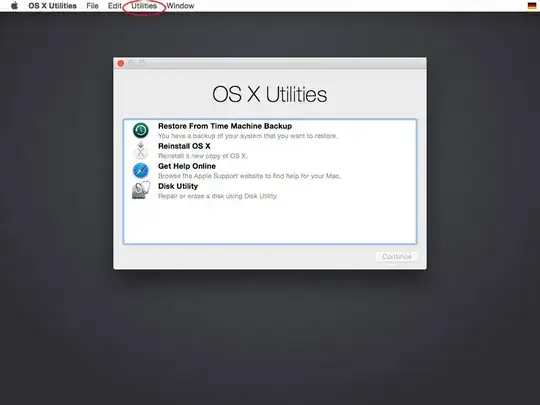
Please replace "YourMainVolume" with the name of your main Mac volume (probably "Macintosh HD") in the following commands.
If you made a backup of your SystemVersion.plist (like advised in my answer) enter:
rm "/Volumes/YourMainVolume/System/Library/CoreServices/SystemVersion.plist"
and hit ↵, then enter:
mv "/Volumes/YourMainVolume/System/Library/CoreServices/SystemVersion.plist.backup" "/Volumes/YourMainVolume/System/Library/CoreServices/SystemVersion.plist"
and hit ↵.
Enter exit, hit ↵, quit Terminal and restart your Mac.
If you didn't make a backup of your SystemVersion.plist enter:
vi "/Volumes/YourMainVolume/System/Library/CoreServices/SystemVersion.plist"
and revert the edits you made previously. (vi Quick reference)
Quit Terminal and restart your Mac.

