11

I just got a new iPhone 6 for my SO and noticed that it is quite toasty to handle with the battery draining quite fast. It has been 24 hours since I first set it up. I plugged it into Instruments and loaded the Activity Monitor and noticed that accountsd is chewing through 80% of the CPU:
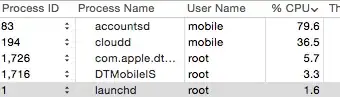
enter image description here

What is accountsd on iOS and why is it chewing up so much CPU?

  • 1
    It might be trying to gain access to the keychain on iCloud. Means the keychain needs to be repaired. – Ruskes Nov 08 '14 at 01:53
  • @Buscar웃 A restart seems to have resolved the issue, but I am still curious what accountsd does on iOS. – Wayne Hartman Nov 08 '14 at 15:15
  • It syncs accounts and managed them and their secrets (credentials). Most commonly AppleID and email accounts, but also instant messaging and social networks. – John Keates Sep 22 '16 at 00:07

1 Answers1

1

Accountsd and cloudd manage iCloud. There's an insanely annoying bug which lots of people have where a sign into icloud password prompt comes up every few seconds and you can't sign out of find my phone.