Possible Duplicate:
How do I type a command character (⌘) in Mac OS X?
Do I have to copy paste those ⌘ stuff from online sources?
Possible Duplicate:
How do I type a command character (⌘) in Mac OS X?
Do I have to copy paste those ⌘ stuff from online sources?
EDIT: I found another way to do this, and is much easier and less complicated.
Go to the Language and Text preference pane and select the Text section.
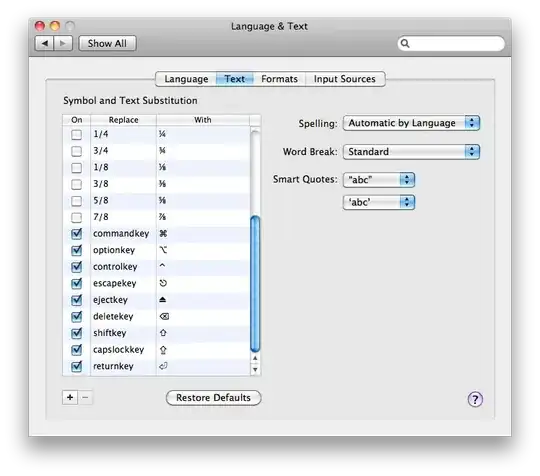
From there, you can substitute typed-in text with the symbols that you want. For example, I set commandkey to be replaced with ⌘. This makes it much easier to type in the symbols.
No, you do not need to.
Go to System Preferences, and open the Language and Text Preference Pane. Select Input Sources, and select Unicode Hex Input:
After doing this, select Unicode Hex Input as your language input (as shown below), and you can enter the characters using the unicode hex of the character, by holding ⌥+ABCD, where ABCD is the unicode hex.

The unicode hexes are (the ones you requested and a few others):
21E7231823032325232B21EANothing predefined, but you could probably create some, if not via the Keyboard prefpane then with something like KeyRemap4Macbook. You don't need to go online to get a copy-paste source, though; use the Character Viewer. (You probably want to turn on the keyboard and character viewer in the Keyboard prefpane; then you can click on the flag in the menubar and select Show Character Viewer.
For what it's worth, I handle special characters I use often with a PTHPasteboard pasteboard that is docked to a screen edge and autohides; that way I can just slide the mouse to that screen edge, scroll if needed for the appropriate pasteboard entry, and click to insert it.


