Does OS X have a Windows Shift + F10 equivalent? I need a keyboard shortcut to open the context menu without a mouse.
Asked
Active
Viewed 4,230 times
3

-
This is a duplicate of http://apple.stackexchange.com/questions/32715/how-do-i-open-the-context-menu-from-a-mac-keyboard?rq=1 – studgeek Nov 12 '15 at 18:22
1 Answers
4
As far as I can see, you have two options.
Mouse Keys
When using Mouse Keys, you can use the keyboard to move the cursor. If you have a numerical keypad, the numbers around 5 are used to move it and 5 is used to click. Without a keypad, it's mapped to the nine keys surrounding I (789/UIO/JKL).
Just like with a mouse or trackpad, you can hold ⌃ control while pressing 5 or I to bring up the context menu.
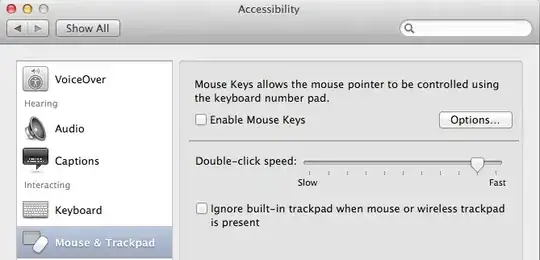
You can turn on Mouse Keys in System Preferences > Accessibility > Mouse & Trackpad, or enable the press-shift-five-times toggle shortcut, or press ⌥+⌘+F5 to bring up a window of Accessibility toggles, including Mouse Keys. This is important to know, as Mouse Keys makes typing impossible, at least without a number pad.
Third party utility
There are many applications that let you customize keyboard shortcuts, etc. There's BetterTouchTool (free), or Keyboard Maestro ($36), or several others. Any of these should let you create a shortcut to “right-click”.


Tuesday
- 15,204
-
nice answer, cool utilities. wish apple would build in the shortcut natively ... – culturalanomoly Jul 01 '14 at 04:54