I managed to get full 3840×2160 @30Hz on my late 2012 rMBP (intel HD4000) using just a mini-displayport to displayport cable and an app called SwitchResX. The only possible difference is that I used the AOC U2868PQU 4K display which uses MST and I think your display is only SST. Anyway Here are my custom settings, you need to reboot the machine to apply them:
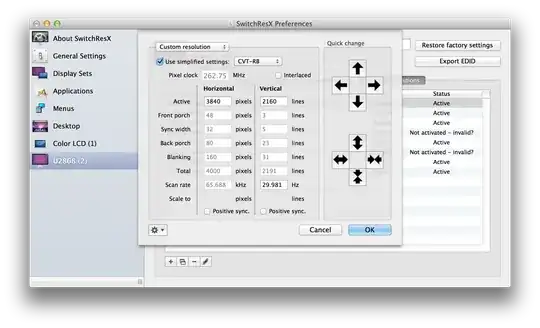
As a word of warning, this does make things eye-bleedingly small. (Pretty cool though - full-size)

Personally, I found the ‘scaled’ resolution of 1920×1200 to be the best for me because it uses HiDPI to give you that retina feel you’re used to. It will look like 1920×1200 but actually use more pixels to paint it. Here are the settings:

This is much more sensible (although I would like it smaller to be honest).
The downside is that you lose some of the screen down the sides. Let me know if you have any better suggestions.
If you find the colours going a bit funny, I used SwitchResX to change the color profile to sRGB IEC61966-2.1 like this:

For more details, go to my blog post here: http://www.mattburns.co.uk/blog/2014/09/30/running-the-4k-aoc-u2868pqu-and-intel-hd4000-graphics/


