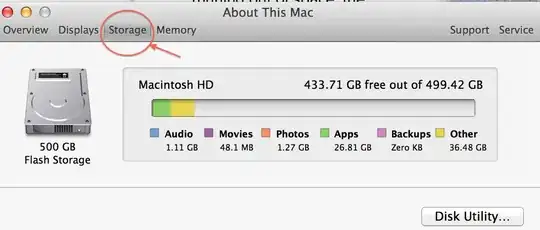
I usually check the Hard Drive capacity in the Activity Monitor. But when I checked it, it literally looked different. I selected each tabs, trying to find the information about my disk but to no avail. How can I find the disk occupied in my hard drive?
Asked
Active
Viewed 1.0k times

2 Answers
3
You can check it via Finder. Just select the Hard Drive and press CMD + I.
Or
- Click on the Apple icon on the menu bar
- Select
About This Mac, then click onMore Info. - Select Storage

revolver
- 4,369
-
I hate that this was removed from activity monitor. It actually makes me want to switch operating systems, I loved being able to see it right there. One user warns that this info may no longer be live-updated. http://forums.macrumors.com/showthread.php?t=1661957 – AnneTheAgile Jul 31 '14 at 16:28
1
Sometimes a picture is worth many words:
Notice that the top words are TABS and then click on Storage.

bmike
- 235,889

AnneTheAgile
- 179