When I first turned on my Galaxy Tab 10.1, I told it to automatically set the time. Unfortunately now the time zone is set to GMT+00:00 in the Date & time settings, and is disabled (so I can't change it). How do I enable the time zone setting so I can change it?
Asked
Active
Viewed 3.6k times
17


-
I am having the same issue, too. Manual settings are disabled! – May 11 '11 at 18:00
7 Answers
13
I downloaded a free app called TimeZone Changer to fix this problem. Still don't understand why Samsung disables this.

Matthew Read
- 50,567
- 30
- 145
- 273

Will Turnage
- 146
- 2
-
Samsung didn't intentionally disable it. I'm told these tablets have pre-release software (that will be updated) and this is a bug. – Daryl Spitzer May 11 '11 at 22:55
-
Worked for me as well. Much better than having to factory reset my device. – Matt Guest May 11 '11 at 23:30
-
1
-
I emailed customer support and they told me to factory reset the device. Glad I saw this! – Nathan Schwermann May 18 '11 at 21:43
5
The problem is that the "Automatic Time Zone" setting on the Samsung Galaxy Tab defaults to on, and the preference to disable it is missing from the built-in settings application.
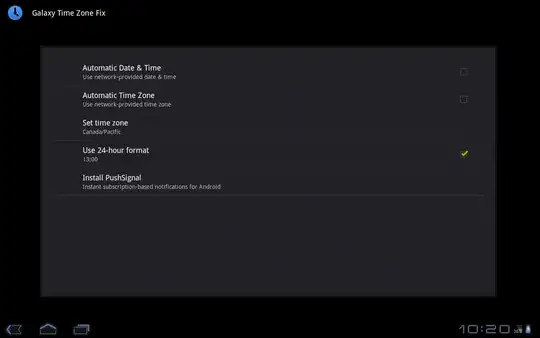
There is an app on the Android market specifically designed to correct this issue called Galaxy Time Zone Fix. It mimics the "Date & Time" section of the built-in settings application but adds the missing preferences.

Templar
- 151
- 3
5
I could not get it to change timezone or time either. Could not make it stop using network time either. i did a factory reset (from settings | privacy), correctly set my timzeone this time BEFORE saying use network time, and that worked fine.

ABonhomme
- 51
- 2
-
The guy at the Samsung support desk at Google I/O said the same thing. – Daryl Spitzer May 11 '11 at 22:22
1
Uncheck "Automatic - Use network-provided values". It should be the first entry in Settings -> Date and time.
Matthew Read
- 50,567
- 30
- 145
- 273
-
1That entry isn't there (in the Data & time settings). Perhaps this is a bug in Samsung's Honeycomb port. – Daryl Spitzer May 11 '11 at 03:20
-
1@Daryl That's unfortunate. I'll leave this answer here in case it gets fixed or people with other devices drop by. – Matthew Read May 11 '11 at 16:02
0
we struggled with this, then solved it, then months later had it again, and struggled again - did everything, but always it reverted to the default time zone after a moment or two, or three ... then did :
power off ... power on, went into Settings as soon as we could, Auto Time was ticked, Auto Time Zone not ticked, selected our time zone from the list, tapped Home & went back to our favourite app - and it has been fine since, with no reversion ...

CJUK
- 1


-1
You can go into the calendar app and under settings there is a checkbox titled "use home time zone". Check that box and then you will be able to adjust the time zone.

Herb Lainchbury
- 7
- 1
-
This only allows you to change the time zone for the calendar; the system time zone is still fixed at the old setting. – Shawn Lauzon May 15 '11 at 02:00