18

I got a very long list of free hotspots and friends/family networks on my phone.

Recently I bought a tablet and I'm trying to find a way to copy the wireless manager list to this new device. Any idea how to do that? Both devices are rooted and running ICS.

Izzy
  • 91,166
  • 73
  • 343
  • 943
Lord_JABA
  • 351
  • 1
  • 4
  • 8
  • 1
    I thought this happened automatically, at least if you've enabled the "back up my data" option. – offby1 Sep 02 '12 at 16:48

2 Answers2

13

As you are rooted: Wireless network data are stored in data/misc/wifi/wpa_supplicant.conf -- so you could basically copy all its network entries from one device and insert them on the other. The entries look like

network={
    ssid="Telekom"
    key_mgmt=NONE
    priority=42
}

An easier way would be using the App Wlan Backup & Recovery (root): Backup all entries on one device, and restore them on the other. As you can see in below screenshot, the tool can even send the backup by mail -- so transfer to the other device should be easy:

Wlan Backup Wifi Passwords

But reading the comments on this app suggests it does not always work as expected: Users even recommend to use the manual way I described above.

Another option is using Titanium Backup, and restore the Wifi data on the other device. I did that successfully a couple of times, also cross-device and cross-ROM.

Third option is offered by the app Wifi Passwords (about USD 1), which allows you to share networks.

Izzy
  • 91,166
  • 73
  • 343
  • 943
  • 1
    TitaniumBackup (TiB) also allows to back this up on one and restore it on another device. TiB also offers an alternate XML based backup scheme for that (in case the old phone's wpa_supplicant.conf contains device specific stuff that doesn't work on the new device. At least that's what TiB shows as a hint if you choose between pure file based or XML based backup schemes). – ce4 Sep 05 '12 at 18:19
  • There is one wi-fi connection where it was open but you had to enter a password in the browser, but you only had to do this the first time (so it's saved in some sense). Do you know if this method would copy it? – Celeritas Jan 21 '17 at 01:39
  • @Celeritas I doubt that. I don't know where that password is stored, but most likely on the "captive portal" (after verification, the device's MAC address probably is stored as "verified" there). – Izzy Jan 21 '17 at 12:02
3

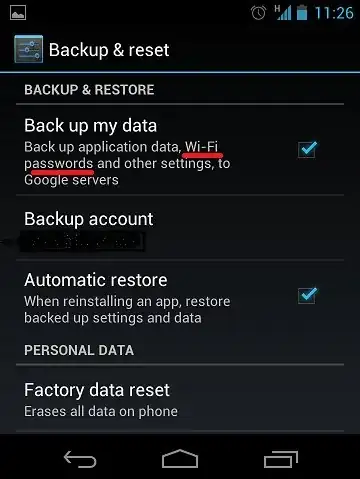
You can do this without root permissions as its built into Android ICS. Just go to:

Settings -> Backup & Reset

enter image description here

Then when you setup the tablet you can restore all the Wi-Fi data from your phone when you sync from the same Google account.

Nick
  • 680
  • 3
  • 7
  • 16
  • 3
    This is only an option if you're fine with all your date being stored on Google's servers, though. – lethal-guitar Feb 09 '15 at 16:10
  • Is there any way to validate that this data has been backed up once you turn on the checkmark? – mikebabcock Jul 08 '15 at 02:27
  • 3
    There is no reliable way to ensure that WiFi's are backed up on Google servers. Moreover, there is high chance that restore will not work. For me it does not work very often. – Maris B. Apr 11 '16 at 13:41