10

I need to log how long I spend on the phone. In Lollipop, this seems impossible:

  • First, the dialer only shows the start time.
  • Second, if I make multiple calls to one number, the logs become inaccessible as they're grouped, and entering the contact record only shows the most recent history.

Is there a way to see the actual logs?

Andrew T.
  • 15,988
  • 10
  • 74
  • 123
artfulrobot
  • 677
  • 3
  • 8
  • 14
  • I don't think there's a native solution. But lot's of third-party-ones: see my list of apps for Statistics for calls, messages, data – Izzy Mar 17 '15 at 19:37
  • No native solution, it's crazy what Google thinks will be too much information for our simple minds... – artfulrobot Mar 17 '15 at 19:57
  • Yeah, but nothing we can do about that, can we? So third-party is the next best thing. If you want a closer recommendation, come over to SoftwareRecs :) – Izzy Mar 17 '15 at 20:49
  • OK, if you want to post a "no you can't do it in stock lollipop, get an app" answer I'll accept it. – artfulrobot Mar 17 '15 at 22:26
  • There you go – even with a good candidate mentioned :) – Izzy Mar 17 '15 at 22:49
  • 1
  • What is your model and carrier? I was just researching this same issue for my Samsung Galaxy S3 on Boost Mobile, and found several forum discussions revealing that on the Sprint network (over which Boost also operates), call durations were exposed in the stock call log on ICS, but went away with the JB update, while S3 owners on other networks continued to have access to their call durations on JB. Since the discussions I found were mostly from 2011-2012, I don't know if L omits duration from the logs on all carriers, but it's certainly an avenue to explore. – Dan Henderson Aug 20 '15 at 18:15

4 Answers4

11

From the phone app, tap the Action Overflow button (...) in the top-right corner, then tap Call History. Tap any entry, then Details, and it will show you the date, time, and LENGTH of call, or calls (individually, in a list) if multiple were grouped together.

TurboFool
  • 1,007
  • 1
  • 6
  • 14
  • Seems not to work that way on all devices. On my O4C (running JB) there's a) no overflow button, b) using the "menu" key, there's no "call history" entry. While it has a separate call-log tab, that doesn't allow for grouping (just filtering, via the "menu" key). So maybe that's device-specific (ad different devices/manufacturers might use different "phone apps") – or was introduced with a later version of Android? – Izzy Mar 18 '15 at 11:55
  • The questioner specified Lollipop, which is what I based my answer on. I don't have a pre-Lollipop device handy to see how they compare, but I feel relatively confident there WERE comparable solutions. But they change the layout of the dialer in ever version. Plus OEMs modify it in all sorts of ways. Sorry I can't be more help on that one. – TurboFool Mar 19 '15 at 00:25
  • 1
    Thanks anyway. Of course you're correct that OP asked specifically for Lollipop (and thus will be happy). Was just checking when that might have been introduced. – Izzy Mar 19 '15 at 00:58
  • works on nougat (7.1) as well. – joseph_morris Oct 09 '20 at 00:01
1

To my knowledge, there is not (and never has been) a native way to achieve this. However, that doesn't mean it's not possible: for most of the details, it's just the frontend that's missing (data is available in the resp. "data providers"). But to investigate the data, you would need a 3rd party app.

There's a manually curated list of hand-picked apps available on my Android website you could chose from: Statistics for calls, messages, data. Depending on what features you favour (how much details you need, how fancy it should look, etc.), different pieces of it might suit you.

If you prefer to get a few choices introduced closer, head over to SoftwareRecs (the link goes to their rules: SR is quite strict for what questions – or answers – must contain to not be "dropped").

Firelord
  • 25,084
  • 20
  • 124
  • 286
Izzy
  • 91,166
  • 73
  • 343
  • 943
1

Here is the solution (but needs root in some cases). It wasn't showing for me too even after updating the Contacts app. And then I found that the Contacts app on my relative's phone shows:
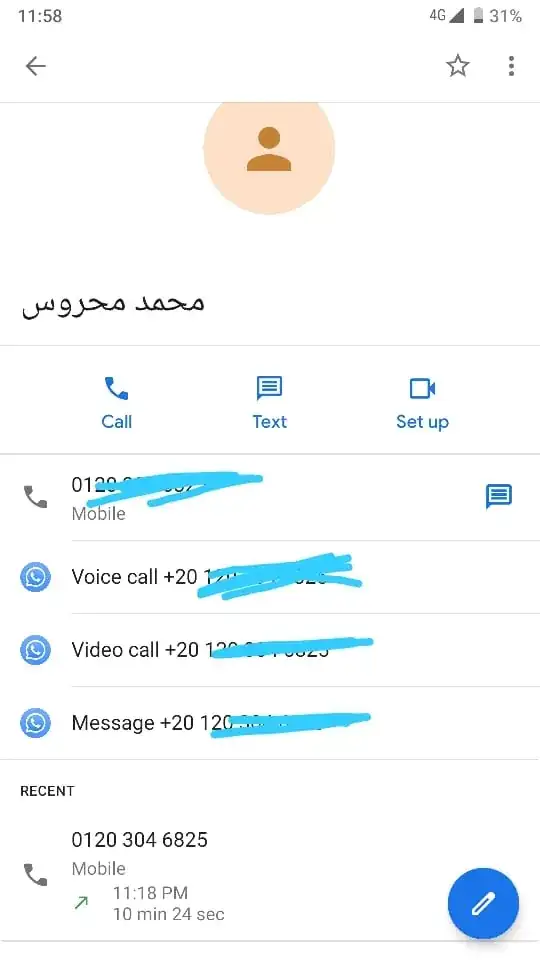
I realize that she had an old version. Even if I deleted all the updates, it is still older than mine (by the way, both run on Pie Android One phone). She sent me the APK of Contacts but I couldn't install it because it older version. So, I opened Titanium Backup, pressed and hold on Contacts, turned it into a user app, uninstalled it, installed the version that she sent to me, and then make it a system app again with Titanium Backup (or any alternative app that transforms a system app into a user app), and it worked really well.

Anyway, the version that shows the time of the call is 3.0.7.210756853. So you should uninstall the updates of the app (from app info, then the top-right corner, and uninstall updates). Then, if you have a version older than 3.0.7.210756853, you don't need root or Titanium Backup or that kind of stuff. All you have to do is to download this version and install it. But if you uninstalled the updates and it is still newer than 3.0.7.210756853, you should have root and do what I explained above.

Andrew T.
  • 15,988
  • 10
  • 74
  • 123
1

In the 'Recent Calls' list or 'Recents', touch the name of the person/business. NOT the picture or letter icon/initial, which will open the contact - or the phone icon, which will call them again.

If you touch the Name itself, it should drop down another menu with "Video call", "Message" AND "History". Touch History and you'll have a list of calls made WITH Duration.

Andrew T.
  • 15,988
  • 10
  • 74
  • 123