I have been searching around on google and not found any answers to this dilemma. I am using a Prusa I3 printer with PLA, trying to print horseshoes for the company I work for. They are for model horses, so quality is fairly important. I seem to have gotten all the settings dialed in just the way I want them and for the most part, the prints come out fine. There is however one annoying thing that keeps happening. When the filament is going around the curve of the top of the horseshoe on layers beyond the first, the filament does not follow the curves of the first layer. But its not every time. It seems like it is just the 2nd or 3rd Layers that are doing it. I have adjusted the flow rate, the speed, the layer height, temperature, and nothing seems to get rid of this irksome issues. I can of course provide more in depth details, and am including a pic of what i am getting. Any Ideas?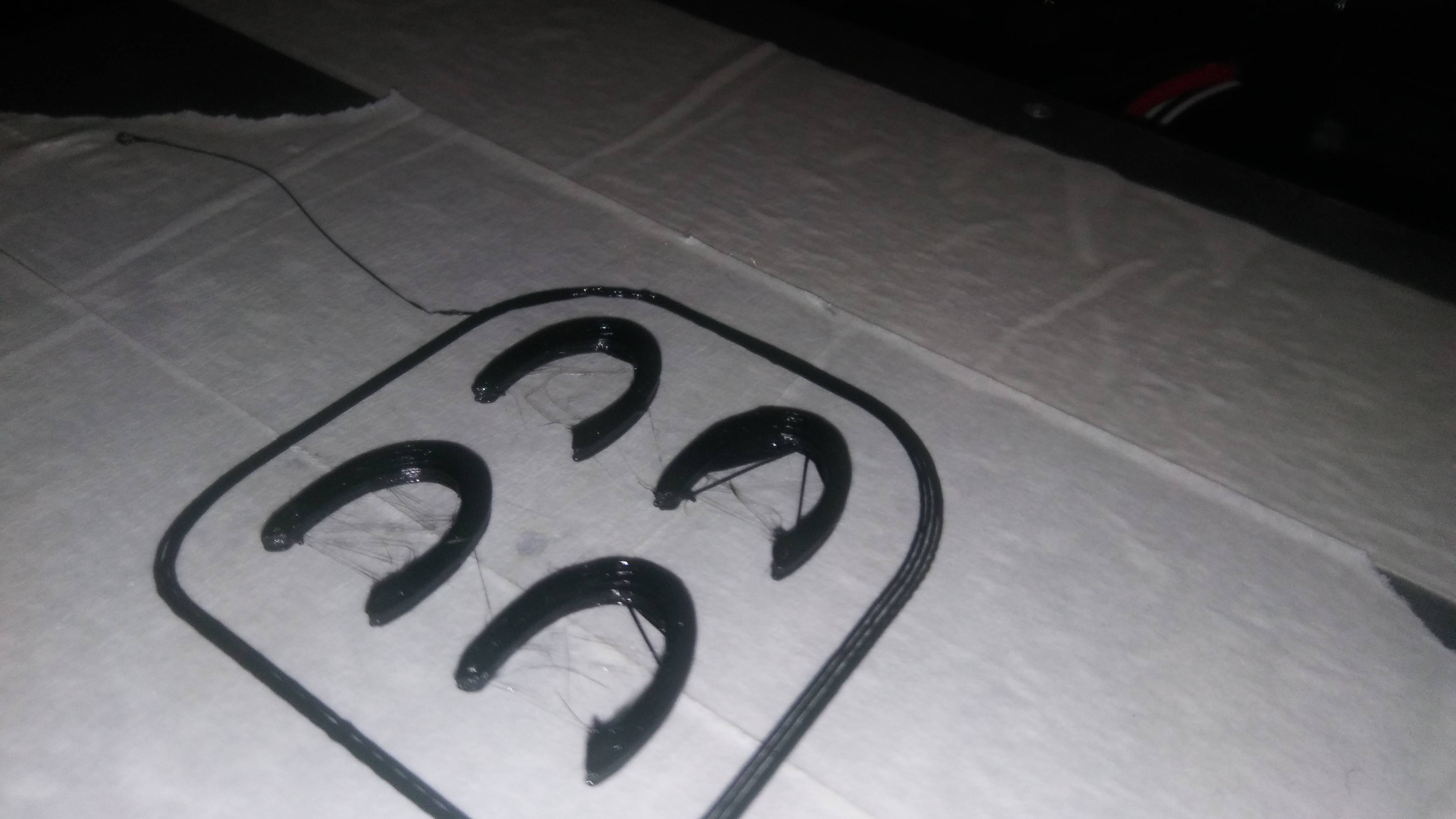

- 109
- 1
- 6
5 Answers
It could very well be that your print speed is too high (starting from the 2nd layer) for the motors to keep up comfortably. Try reducing the print speed to perhaps 75-80% of what you are using to see if it addresses the issue. You should also check you model to make sure there are errors in the STL. Sometimes such mesh errors can cause funny things to happen. Do you see the irregularities in the print preview at all?

- 131
- 2
I got the same problem on a Ultimaker 3 with Cura. The problem was, that there is a hidden option for the initial layer. By default the first layer is set to something around 130-150 % of the normal layer height.
So if you set up 0.2 mm the initial layer will be printed with 0.27 mm and this can cause problems. After setting this initial layer height to also 0.2 mm the print stuck really good at the bed.
I also made similar observations on my own Anet A8.

- 6,708
- 8
- 39
- 68

- 668
- 4
- 16
Is that printed on to tape? It looks very uneven. I'm guessing this is general bad adhesion and its just showing up best when going around curves. If you print onto tape, try putting it down with a squeegee, so it's absolutely flat and level with no creases or bubbles.
I've personally had very little luck printing onto masking tape.

- 131
- 4
Using a combination of external and small perimeter speed settings (Slic3r), as well as slowing down the overall print speed on the printer itself, I was able to get reliable curves on the horseshoes. I have also downloaded Cura and am playing with the advanced print options that it comes with.
- 6,708
- 8
- 39
- 68
- 109
- 1
- 6
possible solutions
1) try and increase the extruder temp by 5 degrees for the first layer and see if that helps
2) disable coolign for the first few layers.
3) try adding some PVA glue (washable school glue or elmers washable gluestick) to the masking tape
if the above failed set a z offset (in slic3r the z offset is in the printer tab)
3a) if you manually level with paper and have access to a caliper. change the z offset in your slicer, to a negative of whatever you used to level.
3b) if you manually level and you don't have a caliper set the z offset to -.1, if you used something thicker like a business card try -.15 or -.2

- 81
- 1