I'm on an older Mac Pro, and I bought the ASUS USB-BT400 so that I can use Yosemite's Handoff feature. The problem is, I don't know how to disable the internal Bluetooth and force my machine to use the USB Bluetooth instead. I searched around but didn't find anything that worked.
Asked
Active
Viewed 3.9k times

2 Answers
10
To force your system to use an external Bluetooth controller instead of the internal one, open Terminal and type:
sudo nvram bluetoothHostControllerSwitchBehavior=always
then reboot. To revert to the default OS X behavior, type:
sudo nvram -d bluetoothHostControllerSwitchBehavior
You may need to turn off (or un-pair) Bluetooth accessories that are currently using your internal Bluetooth controller, as they can prevent the dongle from being detected by the Continuity Activation Tool.

DavidD
- 394
-
this worked for me – HAL 9000 Jun 06 '16 at 10:20
-
(Hackintosh) sudo nvram bluetoothHostControllerSwitchBehavior=never – flapjack Sep 03 '20 at 02:45
1
Continuity Activation Tool is a great app for doing all of the command-line stuff necessary to enable Continuity, and it claims to be able to work with USB dongles.

user24601
- 6,242
- 5
- 28
- 54
-
I know all about it. :) But it requires Bluetooth 4.0, which is why I bought this USB dongle which I can't get working. – CaptSaltyJack Mar 20 '15 at 17:55
-
@CaptSaltyJack Are you on version 2.0.0? That's what I'm on, and after I press 1 for "Activate Continuity," it says it'll go with the dongle if it detects you plugging one in. – user24601 Mar 20 '15 at 17:57
-
Yeah, I run
contitool.sh -dand it saysVerifying Bluetooth version... NOT OK. Your hardware doesn't support Bluetooth 4.0, necessary for Continuity. Current LMP Version=4, expected 6.– CaptSaltyJack Mar 20 '15 at 18:07 -
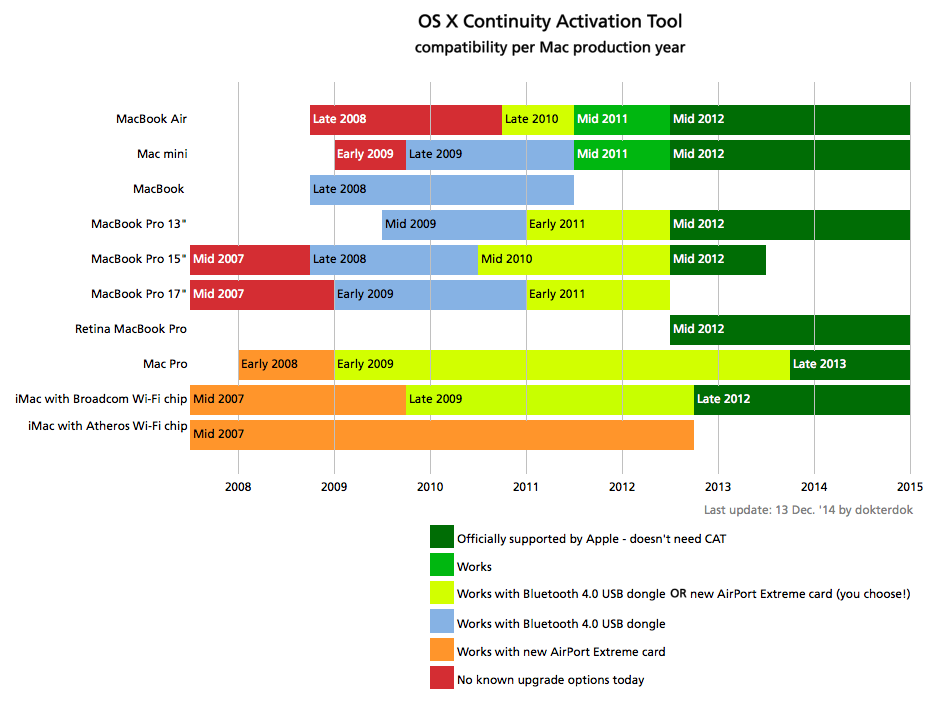
How old is your Mac Pro? This graphic from the developers shows what CAT can and can't do. – user24601 Mar 20 '15 at 18:08
-
-
When I ran "Activate Continuity," it said "If you want to activate Continuity using a USB dongle, then plug-it in now." Try unplugging it and then only plugging it in when prompted? – user24601 Mar 20 '15 at 18:10
-
Ok, will try. Let me ask: can I revert to all the standard kext drivers if something goes haywire? – CaptSaltyJack Mar 20 '15 at 18:14
-
I have to reactivate Continuity every time I reinstall the OS or get a software update, so I assume an OS X reinstall would do the trick. – user24601 Mar 20 '15 at 18:15
-
Weird, it says the script will continue once it detects a USB BT 4.0 dongle, I plug it in, and nothing happens. – CaptSaltyJack Mar 20 '15 at 19:06
-
-
I probably have a dud dongle. :( I plug it in and I don't see it show up in the Apple system info. – CaptSaltyJack Mar 20 '15 at 19:09
-
Oh, if the computer itself isn't detecting the dongle, that's probably it. – user24601 Mar 20 '15 at 19:09
-
Never mind, it's there. BCM20702A0. I'll hit up the developer and check back in later, thanks! – CaptSaltyJack Mar 20 '15 at 19:10
-
1Got it! This was documented in the issues page for CAT. I had to disable Bluetooth, plug in the dongle, enable Bluetooth, and then the tool worked. Handoff is working like a charm! – CaptSaltyJack Mar 20 '15 at 20:04